Mobile SIM Only Plans
Internode’s SIM only mobile phone plans give our customers heaps of data and unlimited talk and text to Australian numbers.
Why Internode SIM Only Plans?

50% off plan fees
for the first 6 months
New Internode mobile customers get 50% off plan fees on ALL mobile SIM plans for the first 6 months. T&C apply.

No lock-in contract
All of our mobile plans are month to month. Plan fees are payable in advance and renewed automatically every month.
Free express delivery
We'll fast-track your free SIM! Get it next business day at no extra cost. Just pay your first month’s plan fee and complete your order before 12pm weekdays. Metro areas only.
Trial our 5G network
We’ve extended the trial of our 5G network on our 55GB Plan until further notice. Find out more and check coverage here. Also, our 4G network reaches over 23 million people across Australia.
Easy activation
When your new SIM card arrives, simply hop online and activate it in MyInternode. If you’re switching from another mobile provider, you can keep using your old SIM until it stops working.
In light of recent events in Ukraine, Internode is offering free standard international mobile calls from Australia to Ukraine (+380).
Free calls to Ukraine offer available until withdrawn. A small number of customers may still see charges after placing mobile calls to these countries. In this instance, please contact customer service for a full credit.
The call rates below are for the current plans. If you purchased your plan prior to 5 August 2020, please click here to view call rates.
- Mobile Call Rates
- International Call Rates
| Type of Service | Rate |
|---|---|
| Standard Voice Calls | |
| Calls to Standard Australian Numbers | Unlimited |
| Calls to Standard International Numbers | International Call Rates |
| Standard Video Calls | |
| Standard National Video Calls | $1 per minute + 40c flagfall |
| International Video Calls | $1.50 per minute + 40c flagfall |
| Standard SMS & MMS | |
| SMS to Standard Australian Mobiles | Unlimited |
| SMS to International Mobiles | 50c per message (max 160 characters) |
| MMS to Standard Australian Mobiles | Unlimited |
| MMS to International Mobiles | 75c per message |
| Voicemail | |
| Voicemail Deposit within Australia | Unlimited |
| Voicemail Retrieval within Australia | Unlimited |
| Special Numbers | |
| 13/1300 numbers | Unlimited |
| 1800 numbers | Unlimited |
| 1900 numbers | Unsupported |
| Directory Assistance 1223 | $2 per call |
| Calls to Internode Support | Unlimited |
| Other Services | |
| Diversions (within Australia) | Unlimited |
| Diversions (International Numbers) set up manually on your phone | Not Supported |
| Premium SMS | Not Supported |
- Africa
- Asia and Middle East
- Europe
- North America
- Oceania
- South America
- Satellite
| Country | Country Code | Flag Fall | Rate/Minute ($A) | 100 Minutes in Extra Large Plan |
|---|---|---|---|---|
| Algeria | 213 | $0.35 | $0.44 | Included |
| Angola | 244 | $0.35 | $0.13 | Included |
| Ascension Island | 247 | $0.35 | $0.96 | Included |
| Benin | 229 | $0.35 | $0.35 | Included |
| Botswana | 267 | $0.35 | $0.32 | Included |
| Burkina Faso | 226 | $0.35 | $0.44 | Included |
| Burundi | 257 | $0.35 | $0.70 | Included |
| Cameroon | 237 | $0.35 | $0.42 | Included |
| Cape Verde (Cabo Verde) | 238 | $0.35 | $0.38 | Included |
| Central African Republic | 236 | $0.35 | $0.59 | Included |
| Chad | 235 | $0.35 | $0.60 | Included |
| Comoros | 269 | $0.35 | $0.52 | Included |
| Congo (Brazzaville) | 242 | $0.35 | $0.47 | Not included |
| Congo, Democratic Republic of the (Kinshasa) | 243 | $0.35 | $1.50 | Included |
| Diego Garcia | 246 | $0.35 | $1.47 | Included |
| Djibouti | 253 | $0.35 | $0.52 | Included |
| Egypt | 20 | $0.35 | $0.14 | Included |
| Equatorial Guinea | 240 | $0.35 | $0.26 | Included |
| Eritrea | 291 | $0.35 | $0.36 | Not included |
| Eswatini (formerly Swaziland) | 268 | $0.35 | $0.25 | Included |
| Ethiopia | 251 | $0.35 | $0.36 | Not included |
| Gabon | 241 | $0.35 | $0.66 | Included |
| Gambia | 220 | $0.35 | $0.64 | Included |
| Ghana | 233 | $0.35 | $0.33 | Not included |
| Guinea | 224 | $0.35 | $0.63 | Not included |
| Guinea-Bissau | 245 | $0.35 | $0.63 | Included |
| Ivory Coast (Côte d'Ivoire) | 225 | $0.35 | $0.48 | Included |
| Kenya | 254 | $0.35 | $0.22 | Included |
| Lesotho | 266 | $0.35 | $0.32 | Included |
| Liberia | 231 | $0.35 | $0.57 | Not included |
| Libya | 218 | $0.35 | $0.44 | Included |
| Madagascar | 261 | $0.35 | $0.86 | Included |
| Malawi | 265 | $0.35 | $0.34 | Included |
| Mali | 223 | $0.35 | $0.46 | Included |
| Mauritania | 222 | $0.35 | $0.68 | Included |
| Mauritius | 230 | $0.35 | $0.68 | Included |
| Mayotte | 262 | $0.35 | $0.14 | Included |
| Morocco | 212 | $0.35 | $0.59 | Included |
| Mozambique | 258 | $0.35 | $0.34 | Included |
| Namibia | 264 | $0.35 | $0.19 | Included |
| Niger | 227 | $0.35 | $0.30 | Included |
| Nigeria | 234 | $0.35 | $0.12 | Included |
| Reunion | 262 | $0.35 | $0.14 | Included |
| Rwanda | 250 | $0.35 | $0.42 | Included |
| Saint Helena | 290 | $0.35 | $1.05 | Included |
| Sao Tome and Principe | 239 | $0.35 | $0.89 | Included |
| Senegal | 221 | $0.35 | $0.58 | Included |
| Seychelles | 248 | $0.35 | $0.67 | Included |
| Sierra Leone | 232 | $0.35 | $0.65 | Not included |
| Somalia | 252 | $0.35 | $0.86 | Included |
| South Africa | 27 | $0.35 | $0.14 | Included |
| South Sudan | 211 | $0.35 | $0.57 | Included |
| Sudan | 249 | $0.35 | $0.18 | Included |
| Tanzania, including Zanzibar | 255 | $0.35 | $0.37 | Included |
| Togo | 228 | $0.35 | $0.55 | Included |
| Tristan da Cunha | 290 | $0.35 | $0.96 | Included |
| Tunisia | 216 | $0.35 | $0.61 | Included |
| Uganda | 256 | $0.35 | $0.44 | Not included |
| Zambia | 260 | $0.35 | $0.21 | Not included |
| Zimbabwe | 263 | $0.35 | $0.64 | Not included |
| Afghanistan | 93 | $0.35 | $0.32 | Not included |
| Bahrain | 973 | $0.35 | $0.13 | Included |
| Bangladesh | 880 | $0.35 | $0.08 | Included |
| Bhutan | 975 | $0.35 | $0.15 | Included |
| Brunei | 673 | $0.35 | $0.06 | Included |
| Cambodia | 855 | $0.35 | $0.10 | Included |
| China | 86 | $0.35 | $0.05 | Included |
| East Timor (Timor-Leste) | 670 | $0.35 | $1.07 | Included |
| Hong Kong | 852 | $0.35 | $0.05 | Included |
| India | 91 | $0.35 | $0.06 | Included |
| Indonesia | 62 | $0.35 | $0.12 | Included |
| Iran | 98 | $0.35 | $0.10 | Not included |
| Iraq | 964 | $0.35 | $0.30 | Included |
| Israel | 972 | $0.35 | $0.06 | Included |
| Japan | 81 | $0.35 | $0.14 | Included |
| Jordan | 962 | $0.35 | $0.18 | Included |
| Kazakhstan | 7 | $0.35 | $0.28 | Included |
| Kuwait | 965 | $0.35 | $0.14 | Included |
| Kyrgyzstan | 996 | $0.35 | $0.21 | Included |
| Laos | 856 | $0.35 | $0.09 | Included |
| Lebanon | 961 | $0.35 | $0.26 | Included |
| Macau | 853 | $0.35 | $0.15 | Included |
| Malaysia | 60 | $0.35 | $0.06 | Included |
| Maldives | 960 | $0.35 | $1.22 | Included |
| Mongolia | 976 | $0.35 | $0.07 | Included |
| Myanmar | 95 | $0.35 | $0.39 | Included |
| Nepal | 977 | $0.35 | $0.18 | Not included |
| North Korea | 850 | $0.35 | $0.94 | Included |
| Oman | 968 | $0.35 | $0.39 | Included |
| Pakistan | 92 | $0.35 | $0.18 | Included |
| Palestinian Territories | 970 | $0.35 | $0.29 | Included |
| Philippines | 63 | $0.35 | $0.22 | Included |
| Qatar | 974 | $0.35 | $0.28 | Included |
| Saudi Arabia | 966 | $0.35 | $0.19 | Included |
| Singapore | 65 | $0.35 | $0.04 | Included |
| South Korea | 82 | $0.35 | $0.06 | Included |
| Sri Lanka | 94 | $0.35 | $0.20 | Not included |
| Syria | 963 | $0.35 | $0.25 | Included |
| Taiwan | 886 | $0.35 | $0.14 | Included |
| Tajikistan | 992 | $0.35 | $0.24 | Included |
| Thailand | 66 | $0.35 | $0.05 | Included |
| Turkmenistan | 993 | $0.35 | $0.17 | Included |
| UAE (United Arab Emirates) | 971 | $0.35 | $0.26 | Included |
| Uzbekistan | 998 | $0.35 | $0.12 | Included |
| Vietnam | 84 | $0.35 | $0.14 | Included |
| Yemen | 967 | $0.35 | $0.22 | Included |
| Albania | 355 | $0.35 | $0.45 | Included |
| Andorra | 376 | $0.35 | $0.24 | Included |
| Armenia | 374 | $0.35 | $0.27 | Included |
| Austria | 43 | $0.35 | $0.07 | Included |
| Azerbaijan | 994 | $0.35 | $0.47 | Included |
| Belarus | 375 | $0.35 | $0.53 | Included |
| Belgium | 32 | $0.35 | $0.06 | Included |
| Bosnia and Herzegovina | 387 | $0.35 | $0.49 | Included |
| Bulgaria | 359 | $0.35 | $0.17 | Included |
| Canary Islands (Spain) | 34 | $0.35 | $0.11 | Included |
| Croatia | 385 | $0.35 | $0.28 | Included |
| Cyprus | 357 | $0.35 | $0.08 | Included |
| Czech Republic | 420 | $0.35 | $0.09 | Included |
| Denmark | 45 | $0.35 | $0.13 | Included |
| Estonia | 372 | $0.35 | $0.45 | Included |
| Faroe Islands | 298 | $0.35 | $0.30 | Included |
| Finland | 358 | $0.35 | $0.12 | Included |
| France | 33 | $0.35 | $0.06 | Included |
| Georgia | 995 | $0.35 | $0.18 | Included |
| Germany | 49 | $0.35 | $0.08 | Included |
| Gibraltar | 350 | $0.35 | $0.32 | Included |
| Greece | 30 | $0.35 | $0.07 | Included |
| Greenland | 299 | $0.35 | $0.71 | Included |
| Hungary | 36 | $0.35 | $0.09 | Included |
| Iceland | 354 | $0.35 | $0.11 | Included |
| Ireland | 353 | $0.35 | $0.11 | Included |
| Italy | 39 | $0.35 | $0.07 | Included |
| Kosovo | 383 | $0.35 | $0.50 | Included |
| Latvia | 371 | $0.35 | $0.82 | Included |
| Liechtenstein | 423 | $0.35 | $0.29 | Included |
| Lithuania | 370 | $0.35 | $0.07 | Included |
| Luxembourg | 352 | $0.35 | $0.26 | Included |
| Malta | 356 | $0.35 | $0.09 | Included |
| Moldova | 373 | $0.35 | $0.35 | Included |
| Monaco | 377 | $0.35 | $0.50 | Included |
| Montenegro | 382 | $0.35 | $0.52 | Included |
| Netherlands | 31 | $0.35 | $0.10 | Included |
| North Macedonia | 389 | $0.35 | $0.55 | Included |
| Norway | 47 | $0.35 | $0.13 | Included |
| Poland | 48 | $0.35 | $0.11 | Included |
| Portugal | 351 | $0.35 | $0.06 | Included |
| Romania | 40 | $0.35 | $0.09 | Included |
| Russia | 7 | $0.35 | $0.10 | Included |
| San Marino | 378 | $0.35 | $0.07 | Included |
| Serbia | 381 | $0.35 | $0.51 | Included |
| Slovakia | 421 | $0.35 | $0.22 | Included |
| Slovenia | 386 | $0.35 | $0.58 | Included |
| Spain | 34 | $0.35 | $0.11 | Included |
| Sweden | 46 | $0.35 | $0.09 | Included |
| Switzerland | 41 | $0.35 | $0.21 | Included |
| Türkiye (formerly Turkey) | 90 | $0.35 | $0.22 | Included |
| UK (United Kingdom) | 44 | $0.35 | $0.07 | Included |
| Ukraine | 380 | $0.35 | $0.29 | Included |
| Vatican City (Holy See) | 379 | $0.35 | $0.50 | Included |
| Anguilla | 1264 | $0.35 | $0.30 | Included |
| Antigua and Barbuda | 1268 | $0.35 | $0.30 | Included |
| Aruba | 297 | $0.35 | $0.32 | Included |
| Bahamas | 1242 | $0.35 | $0.23 | Included |
| Barbados | 1246 | $0.35 | $0.31 | Included |
| Belize | 501 | $0.35 | $0.34 | Included |
| Bermuda | 1441 | $0.35 | $0.07 | Included |
| Bonaire | 599 | $0.35 | $0.19 | Included |
| Canada | 1 | $0.35 | $0.03 | Included |
| Cayman Islands | 1345 | $0.35 | $0.24 | Included |
| Costa Rica | 506 | $0.35 | $0.13 | Included |
| Cuba | 53 | $0.35 | $1.07 | Included |
| Curaçao | 599 | $0.35 | $0.19 | Included |
| Dominica | 1767 | $0.35 | $0.30 | Included |
| Dominican Republic | 1809, 1829, 1849 | $0.35 | $0.13 | Included |
| El Salvador | 503 | $0.35 | $0.30 | Included |
| Grenada | 1473 | $0.35 | $0.33 | Included |
| Guadeloupe | 590 | $0.35 | $0.11 | Included |
| Guatemala | 502 | $0.35 | $0.22 | Included |
| Haiti | 509 | $0.35 | $0.45 | Included |
| Honduras | 504 | $0.35 | $0.22 | Included |
| Jamaica | 1876 | $0.35 | $0.35 | Included |
| Martinique | 596 | $0.35 | $0.08 | Included |
| Mexico | 52 | $0.35 | $0.08 | Included |
| Montserrat | 1664 | $0.35 | $0.26 | Included |
| Netherland Antilles | 599 | $0.35 | $0.19 | Included |
| Nicaragua | 505 | $0.35 | $0.38 | Included |
| Panama | 507 | $0.35 | $0.20 | Included |
| Puerto Rico | 1787, 1939 | $0.35 | $0.06 | Included |
| Saba | 599 | $0.35 | $0.19 | Included |
| Saint Barthélemy | 590 | $0.35 | $0.11 | Included |
| Saint Kitts and Nevis | 1869 | $0.35 | $0.33 | Included |
| Saint Lucia | 1758 | $0.35 | $0.32 | Included |
| Saint Martin (French) | 590 | $0.35 | $0.11 | Included |
| Saint Pierre and Miquelon | 508 | $0.35 | $0.50 | Included |
| Saint Vincent and the Grenadines | 1784 | $0.35 | $0.34 | Included |
| Sint Eustatius | 599 | $0.35 | $0.19 | Included |
| Trinidad and Tobago | 1868 | $0.35 | $0.31 | Included |
| Turks and Caicos Islands | 1649 | $0.35 | $0.35 | Included |
| USA (United States of America) | 1 | $0.35 | $0.04 | Included |
| Virgin Islands, British | 1284 | $0.35 | $0.34 | Included |
| Virgin Islands, US | 1340 | $0.35 | $0.06 | Included |
| American Samoa | 1684 | $0.35 | $0.07 | Included |
| Antarctica (Australian Antarctic Territory) | 672 | $0.35 | $2.08 | Included |
| Cook Islands | 682 | $0.35 | $1.04 | Included |
| Fiji | 679 | $0.35 | $0.32 | Not included |
| French Polynesia | 689 | $0.35 | $0.41 | Included |
| Guam | 1671 | $0.35 | $0.06 | Included |
| Kiribati | 686 | $0.35 | $0.80 | Included |
| Marshall Islands | 692 | $0.35 | $0.34 | Included |
| Micronesia, Federated States of | 691 | $0.35 | $0.29 | Included |
| Nauru | 674 | $0.35 | $1.17 | Included |
| New Caledonia | 687 | $0.35 | $0.25 | Included |
| New Zealand | 64 | $0.35 | $0.09 | Included |
| Niue | 683 | $0.35 | $1.72 | Included |
| Norfolk Island | 672 | $0.35 | $1.60 | Included |
| Northern Mariana Islands | 1670 | $0.35 | $0.06 | Included |
| Palau | 680 | $0.35 | $0.35 | Included |
| Papua New Guinea | 675 | $0.35 | $0.91 | Not included |
| Samoa | 685 | $0.35 | $0.79 | Not included |
| Solomon Islands | 677 | $0.35 | $1.23 | Not included |
| Tokelau | 690 | $0.35 | $1.70 | Included |
| Tonga | 676 | $0.35 | $0.59 | Not included |
| Tuvalu | 688 | $0.35 | $1.01 | Included |
| Vanuatu | 678 | $0.35 | $0.61 | Not included |
| Wallis and Futuna | 681 | $0.35 | $0.65 | Included |
| Argentina | 54 | $0.35 | $0.16 | Included |
| Bolivia | 591 | $0.35 | $0.24 | Included |
| Brazil | 55 | $0.35 | $0.09 | Included |
| Chile | 56 | $0.35 | $0.08 | Included |
| Colombia | 57 | $0.35 | $0.10 | Included |
| Ecuador | 593 | $0.35 | $0.31 | Included |
| Falkland Islands | 500 | $0.35 | $1.41 | Included |
| French Guiana | 594 | $0.35 | $0.41 | Included |
| Guyana | 592 | $0.35 | $0.40 | Included |
| Paraguay | 595 | $0.35 | $0.18 | Included |
| Peru | 51 | $0.35 | $0.15 | Included |
| Suriname | 597 | $0.35 | $0.29 | Included |
| Uruguay | 598 | $0.35 | $0.25 | Included |
| Venezuela | 58 | $0.35 | $0.09 | Included |
| Inmarsat | 870 | $0.35 | $3.69 | Not included |
| Inmarsat B Global | 8703 | $0.35 | $3.69 | Not included |
| Inmarsat M Global | 8706 | $0.35 | $3.69 | Not included |
| Inmarsat Mini-M Global | 87076 | $0.35 | $3.69 | Not included |
| Inmarsat B HSD Global | 87039 | $0.35 | $3.69 | Not included |
| Inmarsat GAN Global | 87060 | $0.35 | $3.69 | Not included |
| Inmarsat BGAN Voice | 870772 | $0.35 | $3.69 | Not included |
| Inmarsat BGAN ISDN | 870782 | $0.35 | $3.69 | Not included |
| Inmarsat FB Voice | 870773 | $0.35 | $3.69 | Not included |
| Inmarsat FB ISDN | 870783 | $0.35 | $3.69 | Not included |
| Inmarsat iSATPHONE Voice | 870776 | $0.35 | $3.69 | Not included |
| Thuraya Sat | 882 | $0.35 | $3.69 | Not included |
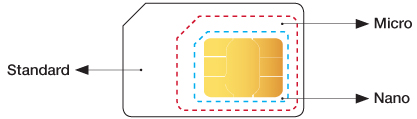
After you purchase an Internode mobile plan, we’ll send you a triple-cut SIM card with the following sizes: Standard, Micro and Nano.
Once you receive the SIM card, simply push out the SIM type you need.
If you are already an Internode customer and need a replacement SIM, please call 1300 704 037.
Trial our 5G network on Internode’s $40 Extra Large mobile plan until 1 June 2023 (unless extended). You’ll need a compatible 5G phone and must be in a 5G coverage area. 5G rolling out to selected areas of major cities.
In non-5G coverage areas, or if you don’t have an eligible Internode Mobile plan or compatible 5G phone, you’ll continue to automatically connect to the 4G/3G Network, where it’s available.
5G Network Trial Terms & Conditions: We are extending our 5G access trial (‘the Trial’) on Eligible Plans to new and existing Internode mobile customers (‘Eligible Customers’) who sign up to, or are currently on the $39.99 Extra Large Plan (‘Eligible Plan’). This means that all Eligible Customers will have or continue to have access to our 5G Network until further notice. If you do not want to participate, or continue to participate in the Trial, please ensure you turn 5G off in your settings on your compatible device. If you are an Eligible Customer and would like to participate, or continue to participate in the Trial, you don’t need to do anything to access the trial, however, you must: (1) have an active mobile recharge on an Eligible Plan; (2) have a 5G compatible device; and (3) be in a 5G coverage area. Please use our coverage checker to find out more about our 5G coverage. If you choose to participate in the Trial, you will not be charged any additional costs (ie. you are only required to pay the fees for your active recharge on an Eligible Plan) and all your standard inclusions for your chosen plan will remain the same.
General for all plans:
All Internode mobile plans are prepaid and auto-renew every month until you cancel. The recurring monthly plan fee is charged in advance, 7 days before the start of the next billing cycle.
Included Data:
All data for use in Australia within 4G coverage areas. When customers are not within a 4G coverage area, the mobile service will automatically switch over to 3G and speeds will be much less than that of 4G.
Actual speeds and functionalities may vary due to things like device capability, location, and network congestion.
Internode Mobile plans have a specific amount of included data each month. Data usage (including for social networking) is not unlimited and will be taken out of your included data. Once all included data has been used, data will not be available until your next monthly billing cycle, unless you purchase Excess Data. Tethering is permitted to personal devices only, but must not be used in a modem or as a substitute for a home internet service.
Internode will endeavour to warn you via SMS when you are about to exceed and have exceeded your included plan value amount. Internode displays the information regarding usage to you at internode.on.net/login. Usage will generally appear in My Internode within 48 hours. You are responsible for any usage irrespective of any warnings.
If you have any questions, please call Internode Customer Support on 13 66 33.
Excluded Usage:
These plans exclude excess data, calls to international numbers (except the Extra Large plan which includes standard calls to select international destinations for 100 minutes), SMS and MMS to international numbers, calls to satellite phones, third party content, video calls to standard Australian and international numbers, international roaming, directory assistance and other enhanced services. Calls and SMS to 19 numbers, diversion to international numbers, and premium SMS/MMS are not available.
Unlimited Usage:
Unlimited National Calls, SMS & MMS to Standard AU Numbers (includes 13/1300). Excludes premium services and video calls. Personal use only. Acceptable use policy applies.
Prepaid Balance:
In addition to your recurring monthly plan charge, you have the option to make additional prepayments for usage that is not within the included value for your plan, which will be classified as your “Prepaid Balance”. Minimum $10 top-up to Prepaid Balance required. You may top-up your Prepaid Balance when you purchase your service or any time at internode.on.net/login. If your service is cancelled, any unused balance of your Prepaid Balance will not be refunded.
Excess Data:
Internode Mobile plans have a certain amount of included data each monthly billing cycle. If at any time in a billing cycle you use up the amount of included data, we will charge $10 out of your Prepaid Balance to increase the amount of included data available in that particular billing cycle by 2GB. If there are insufficient funds in your Prepaid Balance, your mobile data will become inactive until your Prepaid Balance is topped up.
Charges for Excess Data:
We will charge $10 out of your Prepaid Balance (if available) which will give you an extra 2GB to use for the remainder of the billing period.
Over 2GB excess data:
We will charge an additional $10 out of your Prepaid Balance (if available) which will give you an extra 2GB to use for the remainder of the billing period.
Extra Large Plan Inclusion – 100 Minutes of Standard International Calls:
The Extra Large plan includes 100 minutes of standard international calls to select countries each month. See International Call Rates at internode.on.net/mobile-internationalrates for a full list of included countries. Countries may vary. Video calls and calls to satellite phones are excluded. Calls to excluded countries, or calls to included countries after the first 100 minutes, will be charged at Pay As You Go rates (charged from Prepaid Balance, if available). See International Call Rates at internode.on.net/mobile-internationalrates for a full list of call rates.
International Roaming:
International roaming is not available on Internode Mobile plans.
Included usage
- Unlimited calls, SMS and MMS to standard Australian numbers (includes 13/1300) (for use in Australia)
- Unlimited voicemail deposit and retrieval
- Included data as specified for the plan you have purchased
- 100 minutes of international calls per month (Extra Large only)
Standard rates apply for usage outside of the included calls and for excess data. Unused included calls and included data are forfeited at the end of each monthly billing period. Any unlimited usage provided is only for use in Australia.
Excluded usage
- Calls to international numbers (except Extra Large plan)
- Calls to international numbers after the first 100 minutes (Extra Large Plan)
- SMS and MMS to international numbers
- Calls to satellite phones
- Third Party content
- Video calls to standard Australian and international numbers
- International roaming, Directory Assistance and other Enhanced Services
Calls and SMS to 19 numbers, diversion to International numbers and Premium SMS/MMS are not supported.
Included data
Internode plans have a specific amount of included data each month. Data usage (including for social networking) is not unlimited and will be taken out of your included data.
Mobile data is enabled by default on all Internode plans. When using Mobile data, you are able to use services like internet browsing, email, navigation, downloading maps, checking the weather and various other online services on your mobile phone. These services use data.
- If you exceed your plan's included mobile data value, additional excess data usage charges may be payable in accordance with the terms of the plan you acquire.
- Data usage includes combined upload & download data transfer.
- Any unused included mobile data in a month does not roll over into subsequent months and will be forfeited at the end of each monthly billing period.
- The data usage records in MyInternode may be delayed by up to 30 minutes.
Some mobile phones have the capability to run multiple data sessions at the same time. This will be recorded in your mobile usage as overlapping data usage within the same time periods.
These Internode mobile services are prepaid. You must pay the monthly recurring charges in advance. In addition, you have the option to make additional prepayment for usage that is not within the included value for your plan (“Additional Prepayment”) up to the amount of the Additional Prepayment or the balance of it from time to time. You may make Additional Prepayment at the time of commencement of your service or at any time or times afterwards via the MyInternode section of the Internode website. If you choose to make Additional Prepayment, the amount will be debited from your nominated bank account or credit card. We will send you messages about your usage during the month. If your service is cancelled any unused balance of the Additional Prepayment (“Prepaid Balance”) will not be refunded to you but will be retained by Internode. You agree that no bill will be provided for this service and that direct debiting of your account or charge to your credit card may occur notwithstanding that no bill is provided and that it may occur even though you may not have had the opportunity to check charges at least 10 working days before the debit.
Excess data
These plans have a certain amount of included data each monthly billing cycle. If at any time in a billing cycle you use more than the amount of included data, we will charge $10 out of your Prepaid Balance to increase the amount of included data available in that particular billing cycle by 2GB. If there is insufficient funds in your Prepaid Balance, your mobile data will become inactive until your Prepaid Balance is topped up to a sufficient level. If your usage is high, this can occur more than once per month.
Example of charges:
- 1MB excess data: We will charge $10 out of your Prepaid Balance which will give you an extra 2GB to use for the billing period
- Over 2GB excess data: We will charge another $10 out of your Prepaid Balance which will give you another extra 2GB to use for the billing period
Internode will endeavour to warn you via SMS when you are about to exceed and have exceeded your included plan value amount. Internode displays the information regarding usage to you (via MyInternode) 30 minutes after you accrue it. You are responsible for any usage irrespective of any warnings.
For personal use only. Offer available to existing Internode customers who sign up to a new $19.99, $24.99, $29.99 or $39.99 Internode SIM Only mobile plan (‘Eligible Plan’) as an additional service, from 1 May 2021 until offer is withdrawn. Eligible customers receive 50% off Eligible Plan fees for the first 6 months (‘Discount’). Offer not available to customers who already have an Internode mobile service. Discount for Eligible Plans include: $9.99/mth off plan fees on the $19.99 (Small) plan, $12.49/mth off plan fees on the $24.99 (Medium) plan, $14.99/mth off plan fees on the $29.99 (Large) plan and $19.99/mth off plan fees on the $39.99 (Extra Large) plan. Discount will be applied as a monthly recurring credit as long as you stay continuously connected to your chosen plan for the first 6 months. After 6 months, your monthly plan fees will be charged at the undiscounted monthly price for your chosen plan. If you cancel or change your plan within the first 6 months, any remaining monthly discounts you have in connection with this offer will be forfeited.This offer cannot be used in conjunction with any other offer. Offer available online and by calling 13 19 60 only. Services subject to capabilities, network limitations and customer location. Offer not for commercial/resale purposes or exchangeable/redeemable for cash. Subject to change.
Free standard international calls to Ukraine
For personal use only. Free standard international mobile calls from Australia to Ukraine (+380) available to postpaid and prepaid mobile customers from 04/03/2022 AEDT 12:01AM (‘Offer’). Offer is available until withdrawn. Free standard international mobile calls offered by Vodafone, Kogan, Lebara, felix, TPG, iiNet, Westnet and Internode. If your service provider is TPG, iiNet, Westnet or Internode, please check your bill, and if you have been charged for any call to Ukraine during this time, please contact customer service who will apply the relevant credit for you. Exclusions: Premium calls, Premium SMS, SMS, MMS, video calls, calls to satellite phones, and international roaming in Ukraine. MBB, NBN and Tablet Plan customers are excluded from this offer. Services subject to device capabilities, network limitations and customer location. Prepaid customers must have an active mobile service. Not for commercial or resale purposes.
How am I billed for my mobile service?
Internode's mobile service is provided on prepaid basis. Internode will debit your bank account/credit card for the following initial charges during the registration process.
- First month's monthly charge
- Any Prepaid Balance you have requested during signup.
Each month thereafter, you will be charged 7 days prior to the end of the monthly period for the following month's monthly charge.
Are Voicemail deposits and retrievals unlimited?
Yes.
Is there a flagfall or call connection fee for diversion to Australian numbers?
No.
What happens if I use less than my included value?
If you have used less than your monthly included value, the remaining amount will expire at the end of the month. If you use less than the advertised price of the plan you will still have to pay the same minimum monthly charge (which is the advertised price of the plan).
What happens when I use more than my included value?
You will be charged for the calls made outside your included value based on the call rates advertised - funds will be taken out of your Prepaid Balance. If your Prepaid Balance is insufficient, you will not be able to make any usage that is not part of your included value.
I wish to send an audio/voice SMS from my handset. How would I be charged?
Audio/voice SMS is charged as standard MMS. Please view our call rates here
How does the optional Prepaid Balance work?
- In addition to the monthly recurring charges for the included value for your plan, you have the option to make additional prepayment for usage that is not within the included value for your plan up to the amount of that additional prepayment or the balance of it from time to time (Prepaid Balance).
- Prepayment is optional, your default Prepaid Balance is $0.
- You can check or top up your Prepaid Balance at the time of commencement of your service or at any time or times afterwards by logging into MyInternode
- If you choose to top up your Prepaid Balance, the amount will be debited from your nominated bank account or credit card. We will send you messages about your usage during the month.
- If your service is canceled any unused Prepaid Balance will not be refunded to you but will be retained by Internode.
Will I get a text message if I have reached my included value?
Yes. We will send you an SMS alert if you reach 50% and 85% or if you exceed your included value.
What spend management tools does Internode offer?
For mobile services, you can monitor your actual usage by logging into MyInternode. The usage displayed will be delayed for some call types and data usage for up to 30 minutes, and longer for international roaming calls and for any third party services ordered through your mobile service. You can also turn off data, bar outbound calls of various types, restrict roaming, and make use of other spend management tools at no charge, all via MyInternode. For more information about using these tools, please call us on 13 66 33.
How do I activate my SIM Card?
After receiving your Internode SIM card in the mail, you can activate it by simply following the instructions provided with your SIM card. If you have any questions, please call us on 1300 704 037.
Can I bring my own phone?
Of course! However, you may need to unlock your handset from your previous mobile phone provider if it is not able to function on the Vodafone network.
What is 4G?
4G is the fourth generation of mobile telecommunications technology that is capable of much faster speeds compared to 3G. It’s enabled by default on all Internode plans, provided that:
- You have a 4G (LTE 1800/850 MHz) compatible handset
- 4G is enabled on your handset
- You are in a 4G coverage area
If these condition are not met, you will be limited to 3G where available and speeds will be much less than that of 4G.
How do I activate my voicemail?
For your convenience, your voicemail is automatically activated when you connect to our mobile network. To record a personalised greeting or change your settings, simply call 121 and follow the prompts.
To retrieve your voicemail, dial 121. Voicemail retrieval is not charged on Internode plans.
If you are overseas, you will need to dial +61-414-121-121 to retrieve your voicemail. Please note roaming charges will apply if you are calling from your mobile or, if you are using another device overseas, please check the applicable calls rates to Australia.
How do I check my usage and invoices?
You can check your mobile usage at any time by logging into MyInternode.
What’s required for Video calling?
Video calling is handset dependent and both parties of the call must be in a 3G/4G coverage area. For coverage details see coverage.
Which countries can I send international SMS to?
Generally, you can send SMS to countries you can make international calls to. Check our call rates page to see the list of countries you can call from your plan.
Can I use my Internode mobile overseas? (International Roaming)
International Roaming is not available on Internode Mobile Plans.
How do I move all my SIM Card contacts to my new Internode SIM Card?
Firstly, save all your contacts from your previous SIM Card onto the phone. If you do not know how to do this, try consulting your mobile phone manual. Once you have moved all of your contacts onto the phone memory, simply insert the new SIM Card and transfer the contacts from the phone onto the SIM Card!
Can I use my BlackBerry handset on an Internode mobile plan for push email and data?
No, Internode mobile plans are not suitable for use with Blackberry push email and data. Internode does not supply and support BlackBerry Internet Service (BIS). Only voice calls and SMS are supported.
Can I manage my mobile service online?
Yes, you can manage your mobile service online by logging into MyInternode. This will allow you to modify your mobile features such as activating/deactivating data, International Roaming, diversions, and more.
How do I set up call forwarding to international numbers?
Call forwarding to international numbers is not available.
Can I use internet tethering with Internode mobile?
Yes, Internode mobile supports tethering. Tethering will use mobile data from your Internode mobile plan. Any mobile data usage not included in your plan is charged as an excess which comes out of your Prepaid Balance.
In order to use tethering:
- Your handset must support tethering
- Mobile data must be enabled - refer to your handset’s manual or the manufacturer’s website for support information on how to enable tethering on your phone.
What are the SIM card types Internode offers?
After you purchase an Internode mobile plan, we will send you a triple-cut SIM card for sizes: Standard, Micro and Nano.
Nano: For iPhones, iPads and the latest Android phones, push out the Nano area.
Micro: For most smartphones, push out the Micro area.
Standard: For older phones, push out the Standard area.
Once you receive the SIM card, simply push out the SIM type you need.
If you are already an Internode customer and need a replacement SIM, please call 1300 704 037.
What’s included/excluded in my plan?
See your mobile plan included and excluded usage.
International Roaming is not available on Internode Mobile Plans.
Alternatives to International Roaming
- Local SIM
If your mobile phone is unlocked to all networks, you can purchase a SIM from a local mobile provider when you arrive at your destination.
- Travel SIM
Travel SIMs may also offer good value and may allow you to pay with Australian Dollars as well. Make sure you will be able to receive your Travel SIM before you leave Australia if you purchase online.
- WiFi
If you connect to a local WiFi network, you can access the internet without using your mobile data. To prevent mobile data use, you should disable Roaming and 3G/4G mobile data in your mobile phone settings, so the internet can only be accessed while connected to a WiFi network. If you have a smartphone, applications such as Skype and WhatsApp can be used to make calls and send messages using the WiFi network.
- Log in to MyInternode with the username and password you created when you placed your mobile order.
- Select Activate SIM Card. Activations for new numbers should complete within 2 hours.
- If you’re porting an existing mobile number to us, just keep using your old SIM card until it stops working, then that’s your cue to switch to your new Internode Mobile SIM card.
To improve and enhance our services while continuing to deliver the great-value connectivity our customers need, we are no longer signing up new customers to Internode.
New residential customers can sign up to plans at iiNet from 6 December 2023.
This will not disrupt existing customers’ current services at this time and no action is required to continue as a valued Internode customer. Existing customers can still change plans, add new services, update account details, move house, and upgrade to a new broadband technology. Learn more about this change.