



The expert's guide to optimising your ADSL2+ connection
- The Balance Between Speed and Stability
- How Good Could It Get?
- Potential Router Issues
- ADSL2+ Line Profiles
- Potential Cabling Issues
- Problems On The Desktop
- Tuning Your PC
- Wireless Interference
- Call The Experts
- Some Things You Usually Can't Fix
The Balance Between Speed and Stability
When ADSL2+ services are configured to run as fast as the line can support, various factors become important in ensuring stability and speed. These factors typically don't matter as much (or at all) at lower, fixed speeds.
An ADSL service that worked at lower speeds may become unreliable when it is transitioned to a 'full rate' (or 'best effort') ADSL service.
An analogy can be drawn to a motorcycle rider, hammering along a windy road at the edge of a cliff. The faster she rides, the greater the chance of slipping over the crash barrier and… crashing.
The best way to reduce packet loss and drop-outs on ADSL2+ is to slow it down a little. This can take reliability from marginal to 'rock solid' - comparable to that motorcyclist and the merits of backing off 'just a tad' versus going the maximum possible speed on the road.
Conversely, your line may be configured with performance parameters at the other end of the scale - too conservative - and your line may be capable of far higher speeds without losing stability.
Again, the analogy might be compared with the bumps in the road the motorcyclist is riding on - smooth out the bumps and the ride gets faster, without becoming less stable - and after improving those things, the speed can often be cranked up further manually to boot.
The key thing to remember:
A full-rate ADSL2+ service does the best it can with the current line conditions - if your line conditions change, your speed will change too.
Line conditions can vary over time
Sometimes lines get worse (with age) in a manner that cannot be directly fixed, and sometimes the factor influencing speed can be addressed. It's a chain that is only as strong as its weakest link - and there are a lot of links in that chain that influence the outcome.
How Good Could It Get?
Let's start with an upper bound for the performance you might expect from ADSL2+. The graph below provides a sense of the performance curve concerned:
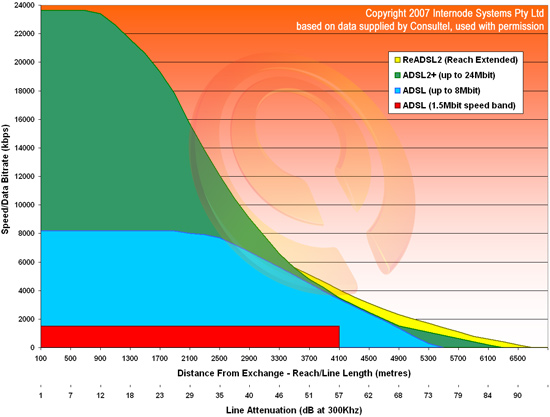 |
| Figure 1: Graph showing the maximum speeds in relation to distance on ADSL1, ADSL2, and ADSL2+ |
It's important to be clear on what this graph is and what it is not.
This graph is an indication of the maximum theoretically possible performance for a given line attenuation/distance from your local exchange.
It does not guarantee anything about the speed on your particular line. This graph represents an upper bound - not an average, not a lower bound, and not a promise. You should expect performance not to exceed this level (though in exceptional circumstances it might).
Over time, real-world performance can gradually reduce due to various factors, such as the presence of other ADSL services in the same cable bundle as your own (causing cross pair interference), and progressive degradation of wiring and joints in the copper line running back to the exchange. These are often things you can't do anything to improve.
Achieved performance can also 'suddenly' change due to factors (listed below) such as your router, the wiring in your premises, and more - these are things you can do something to improve.
Potential Router Issues
Power cycle your ADSL2+ router
Some routers are less than perfect, and develop 'bit rot' after running for a long time.
Additionally, over the course of a long connection, short-term interference may lead to router chip-sets progressively disabling 'buckets' - 64 chunks of overall link capacity. This will cause your connection to get slower in small increments, and that speed may not necessarily come back once the interference passes.
Power cycling your router (turning it off, waiting a few minutes, and turning it on again) can do a world of good.
Try a different ADSL2+ router
Due to differences in chip-sets and software tuning, different routers may perform very differently under real-world conditions. Additionally, sometimes routers can become faulty, causing unpredictable connections with lower speeds or drop-outs.
If you feel that your performance isn't consistent with your line length, test your connection with another router. At best it will solve your problem, and at worst it will eliminate the router as a possible cause.
Bugs in router firmware
If you need to power cycle your router to recover from drop-outs or other problems, your router may have a firmware bug. Make sure your router is using the latest firmware. If the problem persists, consider replacing the router.
Some routers overheat
Some routers become unstable when hot - dropping connections, having trouble connecting, or running slowly/erratically.
We strongly recommend you replace an overheating router. A workaround is to place the router on its side so heat can dissipate more easily.
Ensure your router is an ADSL2+ model in ADSL2+ mode!
Check that your router actually supports ADSL2+ and that it is connected in ADSL2+ mode - the status screen in your router's web interface will usually display this information.
ADSL2+ Line Profiles
Try different ADSL2+ Line Profiles
Internode's ADSL2+ Line Profiles allow you to modify your connection's technical characteristics - to balance speed and stability, or to optimise latency. Line profiles are available to the following ADSL2+ customers:
- Easy Broadband
- Easy Naked (if connected to an Internode DSLAM)
- Extreme ADSL2+
- NakedExtreme ADSL2+
If you are a new customer, have recently relocated, or your service has been migrated to an Internode DSLAM, Internode initially places your ADSL2+ service on the ADSL2+ High Reliability profile - ensuring a stable connection, even if you're unaware of the factors in this article.
You may be able to use a higher-performance ADSL profile to achieve faster speeds without sacrificing stability. If your connection is not stable, simply return to a more stable profile.
For full information about Line Profiles, see the Internode ADSL2+ Profiles FAQ.
Try an ADSL1 connection mode
ADSL2+ varies the amount of power it uses depending on your line conditions. Unfortunately, it does this imperfectly - particularly in the 4-6 megabit speed realm, where it sometimes doesn't use enough power for the signal to be heard over line noise.
If your ADSL2+ speed is between 4-6 megabits per second, you may achieve higher speeds (and a more stable connection) by switching to an ADSL1 mode. This works because ADSL1 (unlike ADSL2+) uses a fixed amount of power - regardless of your line conditions.
Try locking your modem into ADSL1 mode (G.DMT) through the modem interface, or set an ADSL1 mode in the Internode profile changer.
Potential Cabling Issues
Local wiring faults
There are all sorts of potential wiring faults - especially in older buildings - that affect ADSL, including:
- 'Unterminated' sockets
- Old or bad cabling in the roof space
- Partial or total short-circuits (caused by trapped, stretched, sheared, or crushed cables)
- Bridge Taps
For example, a "Bridge Tap" is a length of unused phone cable connected somewhere along your phone line. Depending on the length of the unused cable, this may cause ADSL frequencies to become unusable.
A central splitter and/or wiring checks by a licensed cabler (even for Naked ADSL services) are the best ways to optimise performance and insulate against future faults.
Central splitters address multiple issues
A central splitter is the most effective way to eliminate local cabling problems. In some cases, a central splitter may even increase speed dramatically.
Installing a central splitter creates a new, clean wiring path from the incoming connection to your ADSL2+ router. This bypasses any bad wiring or incorrect filtering in your premises.
If you have a Naked DSL service, a licensed cabler can run a new cable to your ADSL router and physically disconnect other cabling. This may improve performance if you have old, corroded, or complicated wiring.
Once a central splitter is installed, you don't need in-line filters in the rest of your house any more! Plus, most central splitters are built to a higher standard than in-line filters. They are notably less likely to fail and need replacement.
Further information is available on our Internode Authorised Cablers page.
Filter non-ADSL devices properly
Unless you have a central splitter (which eliminates this issue entirely), all non-ADSL devices must have an ADSL filter/splitter installed, including:
- Telephones, fax machines, and answering machines
- FOXTEL
- Alarm systems
- Extension bells
- EFTPOS devices
- TTY systems
Important note:
If it isn't an ADSL modem/router - and it connects to a telephone socket - it needs a filter.
If you have more than three non-ADSL devices, you are more likely to suffer performance problems and drop-outs - in this case we recommend a Central Splitter. This removes all device-count limits, and removes the need for in-line filters at all.
Common symptoms of unfiltered devices on your line include ADSL drop-outs when the phone is in use, and the presence of audible electronic 'hash' (noise) when you make voice calls.
Unfiltered devices that you haven't found yet
Sometimes there are devices on the line that need filters, but that you're not aware of. These may include alarm systems installed by previous owners, or FOXTEL boxes installed without a filter.
To eliminate this issue, we recommend having a central splitter professionally installed. Or simply have your wiring checked by a licensed cabler to avoid problems and prevent future wiring faults.
Use quality ADSL2+ line filters
If you're unable to install a central splitter or have your wiring professionally checked, make sure your in-line filters are good quality and rated for ADSL2+.
Many older filters do not work with ADSL2+ - having been created before ADSL2+'s adoption. These older filters may cause performance and stability problems. Likewise, cheap filters may cause problems with performance or stability.
If you're not sure, either replace the filters, or perform an isolation test (see below) to compare the difference.
Try an isolation test
An isolation test is used to check for interference from faulty splitters/filters, telephone devices, and cables. To perform an isolation test, unplug everything from your phone line, including:
- Telephones, faxes, and answering machines
- ADSL filters and splitters
- FOXTEL or other Pay TV Set Top Boxes which connect to a phone line
- EFTPOS machines
- Back-to-base alarm systems (if possible)
- Extension cables and double adapters
Once you have unplugged everything from your phone line, connect ONLY your ADSL modem - without a filter - and see if your problem continues. If the problem stops, then something you unplugged is the source of your reduced speed and/or drop-outs.
If you do see such an improvement, re-introduce devices one at a time to find the source of the problem.
The presence of a monitored alarm on the line
Monitored alarm systems - like any other telephone device - need a line filter installed to work with ADSL. This will need to be done by a licensed professional cabler.
The best approach is to have the alarm professionally re-wired to include a central splitter. Alternatively, move to an alarm that uses either an Internet or mobile connection to contact the central monitoring centre. Speak to your security company for more information.
Eliminate line power thieves
Some telephone models (most infamously, the Telstra Touchfone T200) draw bursts of power from the phone line at intervals - causing ADSL drop-outs each time. The only solution is to redeploy such phones as doorstops.
Problems On The Desktop
Check cable integrity, length, and placement
Loose, dirty, or corroded cables can have a huge negative impact on performance and stability. Additionally, ADSL2+ signals are highly sensitive to electronic impulse noise and cross-pair interference.
To minimise cabling problems:
- Make sure there are no loose plugs or sockets.
- Eliminate excess phone cable length - phone cables should be no longer than 3 metres - but the shorter the better.
- Avoid having your cabling cross over power cables more frequently than is absolutely necessary.
- Avoid coiled-up phone cabling (this can increase the influence of external noise).
- Avoid phone extension cables or joiners.
Ideally you should move your router very close to the incoming connection, and use either Ethernet cable or WiFi to connect your computers.
Speeds can be affected by interference and damage to a surprising extent - sometimes up to multiple megabits per second - especially on lines operating at high speeds (20 megabits per second or more). Simply shortening your patch cables and moving them away from power cables can be the cheapest performance improvement you've ever made.
EMF from devices near ADSL equipment
We have seen several instances of electronic devices - on the same power circuit as an ADSL router - causing instability via voltage drops or electromagnetic interference transmission via the power or phone line path into the router. In one instance, a touch lamp located near a central splitter caused the link to fail entirely whenever it was turned on!
Devices that rely upon large magnets (the most common problem is speakers) also impact electrical signals and should be placed away from ADSL equipment.
An isolation test involving the disconnection of non-essential electronics can help determine whether this is a factor in your installation.
Incorrect duplex setting on Ethernet ports
Most Ethernet devices automatically detect the right speed and duplex settings, and most people find that it 'just works'.
However, if you have chosen to lock down to a specific speed (10 or 100 or 1000) or duplex (half or full), configure both ends of the connection the same way. Fixing a speed/duplex on one side, while leaving the other end in auto-configuration mode, is a really bad idea - one which frequently results in the auto-configured end managing to auto-configure the wrong settings!
Incorrect duplex and speed settings cause all sorts of performance issues, which will worsen with increasing data flow. The rule is: Both ends of a cable must be set to auto, or both ends must be set manually (and to the same configuration).
Consider an Uninterruptible Power Supply (UPS)
Some power adaptors for ADSL2+ routers are - to put it bluntly - cheap and nasty.
In particular, badly regulated power adapters may result in power voltage being too high, too low, or varying over time. These adaptors may suffer voltage drops in response to other devices on the same circuit drawing large amounts of power - or in response to a drop in the incoming 240v power supply to your premises.
The best approach is to buy an Uninterruptible Power Supply (UPS) and plug your router into it. It's a great idea to buy a UPS large enough to run your computer as well - power problems cause more unexplained computer crashes than you'd expect.
Not only will a UPS eliminate power regulation problems, but it may also provide Internet and phone access during a power failure:
- If you use a laptop, your laptop's battery will keep your computer powered up while the UPS powers the router.
- Plugging your cordless phone base station into a UPS will provide a continuous phone service during a power outage.
NOTE: Some sources of voltage drops can be local (for example, large household appliances on the same circuit, such as air-conditioners and fridges) and others can be remote (for example, the next door neighbour's high powered welder).
Tuning Your PC
Sometimes your ADSL line speed might look great, and downloads from local servers work well (such as Internode's mirror), but download speeds from distant (overseas) sites are slower.
This is a common problem for many computer operating systems made in Redmond, Washington, USA (and some others). If you are running Windows, in particular, and if you haven't yet tuned your TCP/IP stack (Search Google for 'Dr TCP', 'TCP Optimizer', and/or 'tuning TCP window size') - it is worth trying.
TCP Window Size problems are easily proven - if you observe that one download from a well-connected - but internationally distant - server is slow, but that two or more downloads from that location at once all run at the same speed - meaning your total download speed 'fills' your connection if you do multiple downloads at once.
Wireless Interference
Faults or performance impacts related to Wireless (WiFi) connections
WiFi may introduce slowdowns, packet loss, and similar problems:
- WiFi may become a performance bottleneck - limiting the overall throughput of an ADSL2+ connection.
- Interference - usually from cordless phones or Bluetooth - can lower performance.
- WiFi signals may become masked or blocked (or operate over too large a range) creating the appearance of an ADSL fault.
The wireless standards with the greatest potential for problems are those in the 2.4 Gigahertz spectrum - such as the original 802.11b WiFi standard, and the 802.11g standard.
The simplest way to determine if performance problems are caused by WiFi is to bypass it - plug your computer into an Ethernet port. If performance improves, then you've found your bottleneck, and you can either accept the bottleneck or change your WiFi configuration.
The latest versions of WiFi (802.11n) offer substantial improvements in speed, range, and reliability, and are worth considering if you rely upon wireless access.
Bluetooth interference with 2.4 GHz WiFi
Bluetooth is another wireless technology operating in the 2.4 GHz frequency range. If you use Bluetooth and a 2.4 GHz WiFi network, try turning Bluetooth off and see if performance improves. Despite most Bluetooth and WiFi services coexisting well, some combinations of Bluetooth and WiFi services do severely interfere with each other.
The simplest workaround is to change your WiFi network to one that operates in a band other than 2.4 GHz.
Using a cordless phone in the 2.4 GHz band at the same time as WiFi
Like Bluetooth, many cordless phones use the 2.4 GHz wireless band, and may conflict with WiFi. This can lower performance and/or cause problems using the cordless phones.
The best solution is to switch to a DECT cordless phone system, as it uses a different band. You may also be able to adjust your phone and WiFi channels to ensure maximum separation. Alternatively, set up your WiFi on a frequency other than 2.4 GHz (for example, 5 GHz).
Call The Experts
If you've worked through this list and you still have problems, please contact our Support team.
Start by indicating that you have worked through this list. Be prepared to confirm isolation test results, state if your wiring has been checked, and advise if a central splitter is installed - as this will help our Support team troubleshoot your service.
Some Things You Usually Can't Fix
The length of your line
Line length is the primary determinant of line attenuation - the physics here (as per the performance graph) mean that the longer the copper line, the lower the maximum possible speed.
ADSL works by splitting up the line into chunks of spectrum (frequencies) called "buckets" - each containing a 64 kilobit per second path. As line length increases, these frequencies drop out - and as each bucket becomes unviable, you lose another 64 kilobits of line speed.
Non-ADSL spectral interference
Interference can come from surprising sources - not just local to your house, but also from things like high-powered AM Radio transmitters near your copper line somewhere on its path back to the exchange.
These interference sources may prevent a cluster of 'buckets' from working. This means that despite downstream attenuation implying a given speed, your real world speeds may be significantly lower.
ADSL2+ does the best it can with the usable spectrum it is presented with - but interference can remove large parts of spectrum from play. You may be able to reduce external interference by trying different ADSL2+ line profiles, or by installing an appropriate Radio Frequency 'choke' on the phone cable.
Cross-pair DSL interference in street cabling
In areas with high ADSL take-up, you may see reduced performance where large numbers of ADSL services run in the same cable bundle - causing cross-pair interference.
This is the main reason why the theoretical maximum speeds (presented in the graph earlier) become harder to attain in practice - especially in high take-up areas. As more premises take up ADSL, everyone progressively slows everyone else down.
Bridge taps in street cabling
A bridge tap is created when your line historically served another premises, and a run of cable branches off towards the previous end point of the line from a T joint at a Telstra pit or jointing mushroom.
This branch of cable is usually left without anything connected at the end, and may act as an antenna, or - depending on the location and length of the tap - may cause DSL signals to reflect back on themselves. The resulting echo and distortion renders parts of ADSL2+ spectrum unusable, and the more bridge taps on your line, the more unusable spectrum - and less speed.
Physical cable faults, often made worse in specific weather conditions
- Had any rain lately? A lot of old telephone cables suffer from water ingress into joints/pits during serious rain.
- Has it been windy recently? Many old cables are aerial, and are vulnerable to mechanical stress during high winds.
Unfortunately, it can be difficult for wholesale technicians to fix intermittent ADSL faults, particularly if they're only present sometimes (for example, when it rains).
However, as telephone voice service faults take priority and can often be more easily identifiable, your best bet is to check for noise on your phone line. If you have a noisy line, report the fault to your phone provider quickly - before the fault disappears when the weather changes!
Usually the fix (if one is performed) is to repair or replace cable joints or segments that have suffered mechanical or chemical stress, or that have insulation flaws allowing the ingress of water into the joint.
