



Quick checklist for safer Internet use
- Spyware/Adware
- Antivirus Software
- Firewalls
- Patches and Updates
- Email and Spam
- Phishing
- Router Security
- Complex Passwords
Spyware/Adware
Once just an annoyance, spyware and adware now capture everything about your browsing history. In some cases this can even include your banking passwords. Internode recommends that you regularly scan your machine for these programs and remove them.
Some products that can diagnose and clean spyware and adware include:
- Windows Defender
- Adaware
- Malwarebytes
Antivirus Software
Antivirus software is essential for any computer—Windows, Mac, or Linux/Unix. Antivirus detects and removes threats that may cause problems—both for your computer, and other computers in your local network.
While Windows computers are most vulnerable to viruses, Mac and Linux/Unix are still vulnerable. 'Security through obscurity' is not safety.
There are many antivirus options available, in both free or paid versions. In general, free versions lack features, have restricted licenses, or lack customer support. If a company also offers a paid version, these limitations are often shown on a comparison chart on the company's website.
You must keep your antivirus software up to date, and run regular scans of your system. For effective protection, check for updates and run scans at least once a week. Internode recommends purchasing full versions of antivirus software, such as those available from:
- McAfee
- F-Secure
- Avast!
- AVG
Firewalls
Firewalls are an important tool in keeping your PC safe from outside threats. Firewalls inspect the traffic going in and out of your PC and block anything that is not permitted according to its rules. All major operating systems include a firewall which is usually sufficient if configured correctly.
For extra protection or flexibility, there are also several software or hardware solutions available. All routers sold by Internode include a stateful packet inspection firewall. This helps protect your home network from Internet attacks.
Patches and Updates
It is vital that you keep your operating system and software up to date. Operating systems and software may include flaws that allow viruses, malware, or unauthorised access to your computer. Software vendors regularly address these flaws—called vulnerabilities—through software updates.
Vulnerabilities range from minor inconveniences to major causes for concern. These problems affect more than just you and your system—they may allow someone to hijack your computer to attack others on the Internet.
Do not ignore update notifications, and run regular software update checks to make sure your system is up to date.
Email and Spam
Spam is a common email concern, and increasingly more than just a nuisance. Anti-spam filters—both on the email server you're using, and in your email client software—can provide effective protection.
Never respond to a spam email. This only confirms that your email address exists, and encourages the spammer to send more spam. Block the email, delete it, and ignore it.
Spam filters can help keep your inbox free of junk email and messages designed to swindle you (this is called 'phishing'). All Internode email accounts include anti-spam and anti-phishing filters at no extra cost.
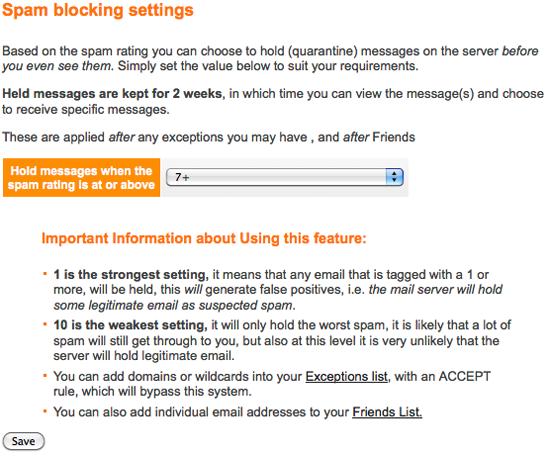 |
| Figure 1: Internode's Spam Filter Settings |
Online spam filters—like the one included with Internode email accounts—'clean' your email before it gets to your inbox. You can also have a local spam filter within your email client software that can be set up to your specific requirements.
By default, Internode's spam filter is set to 7+. If you still receive a lot of spam, you may wish to adjust this to 4+ or lower.
Please be aware that setting the spam filter to 0 will block all emails that you have not explicitly added to your exceptions or friends lists.
Phishing
Phishing (pronounced fishing) is a social engineering technique used to trick people into sharing personal information. Phishing emails use confusing links and misdirection to try to appear like legitimate emails.
Modern web browsers and email clients can detect some phishing attempts and will warn you. However, it's also essential to know the danger signs.
Be wary of emails asking you to confirm or update your personal information. If in doubt, disclose nothing.
In almost all cases, legitimate organisations will not cold-call or email you asking for personal information. Financial institutions will never ask you for your details via email. There is too much potential for a security breach.
There are exceptions, however. For example, if you contact Internode online, we may email back asking for details to help us identify your account or authorise changes. We will only do this when you have contacted us first! If you're unsure, don't give away any personal information.
Look carefully at this example phishing email:
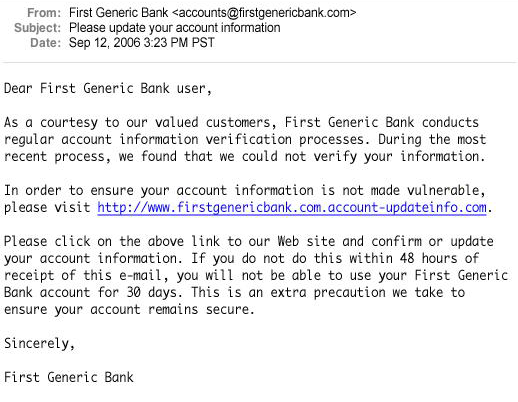 |
| Figure 2: Example Phishing Email: A typical bank scam |
The link address (in blue) may at first appear legitimate—but it has an addition to it that makes it a different link altogether. The top level of the link—.account-updateinfo.com—is different to the bank's official Internet domain of .firstgenericbank.com. This means it's a completely different website.
Phishing emails will often direct you to a website that looks a lot like the legitimate website they are impersonating:
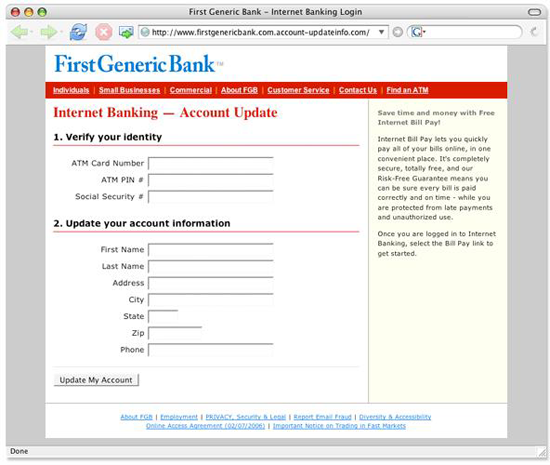 |
| Figure 3: Example Phishing Website: A typical website set up for phishing |
The graphics and text might look legitimate, but there are some subtle differences to look out for. Check for an encryption symbol—usually a padlock in your browser's address bar. Also check if the address starts with https or http—if it's http, it's not a secure website. Also notice if you receive any warnings from your web browser about invalid certificates.
And remember, no bank or organisation will ever ask you for your private credentials via email unless in response to your own request.
Router Security
All residential and commercial broadband routers ship with a set of factory default settings. These are usually the same across a brand's entire range. These settings include the administrator username and password used to log in to the router. You should change this password as soon as you have set up your broadband router.
Routers that still have their default usernames and passwords are easy prey to attacks from the Internet. The Internode Network Firewall prevents many of these attacks, and is automatically enabled for all residential broadband services.
Furthermore, many broadband routers are shipped with wireless enabled and not secured in any way. This means people may be able to use your Internet connection, and snoop on your Internet traffic. To prevent this common exploit, Internode ships routers with the wireless access disabled.
Please follow the instructions carefully when setting up the wireless on your broadband router. It is best practice to have your wireless secured with WPA2. WPA can be used if your devices don't support WPA2—but be aware it can be cracked in under a minute with the right software.
Suggestions for router security include:
- Change the default 'admin' password.
If someone wanted to break into your car, the first thing they would do is check if the door is unlocked. Default passwords for broadband routers are globally known and well documented on the Internet. Using the default password is like leaving your car unlocked. If you change the password on your router, breaking in gets a lot harder. - Use a complex 'admin' password to your router.
Document your password and keep it in a safe and secure place for when you need it. Do not write it down on a sticky note and stick it to your computer. Consider using password management software to store and organise your passwords. - Use a complex password for your Internode account.
Document this password too, and keep it in a safe and secure password. Use a different password to the one for the 'admin' password on your broadband router. - Don't allow 'remote admin' from the Internet.
A broadband router won't tell you if someone is trying to break into it over the Internet. Routers sold by Internode will have remote admin access disabled by default. If you bought a router from a retail store, check this setting—some routers come with this enabled. - If you use WiFi, use a complex SSID and WPA2-PSK encryption.
If your network is secure, nobody can piggy-back on the connection or attack your network through the wireless. The wireless network name (SSID) by default will identify the router make and model—you don't want to do that! Change it to something generic, like 'homewireless'. Avoid WEP encryption unless absolutely necessary. - If you don't use wireless networking, turn it off.
All broadband routers pre-configured by Internode have the wireless network turned off by default. - Never respond to email requests for your Internode username and password—EVER!
This is called 'phishing'—do not reply, not even to tell them that you are onto them. Ignore and delete.
Complex Passwords
Complex passwords are a vital aspect of personal security. The better the password, the harder it is for it to be broken by brute force or simply guessed.
A good way to make a strong password is to include capitals, lower case, numbers and symbols (if allowed). This is the approach used to generate passwords for Internode services.
A trick to remember complex passwords can be mnemonics such as: I have 8 Cousins, 6 aunts, 3 Uncles and 2 grandmothers. This mnemonic results in the password 'Ih8C6a3Ua2g'—a very strong password that is virtually impossible for others to guess.
Examples of strong and weak passwords include:
- 'cat'—a weak password: short, all lower case, dictionary word.
- 'catasTrophy'—a medium password: improved by the use of capitals and lower case letters, but is is still based on a dictionary word.
- 'jaMessm1th'—a medium password: good use of capitals and numbers, but closely resembles a name.
- 'F4c3B00k'—a strong password: good use of capitals, numbers and lower case, and just barely resembles a word.
- '14m3P455w0rDs'—a very strong password: contains capitals, lower case, is of a significant length and has numbers.
The Strong Password Generator can help give you some more ideas.
Privacy and Common Sense
Staying smart online is an important aspect of being safe. Do not share any personal details with people you meet online unless you trust them implicitly. You never know who is trying to get your details for malicious purposes.
Personal details, even subtle ones, can be used to dig up a large amount of information. A school photo might show the school's name or pictures of a home party may show the address. Coupled with the right questions, it's quite easy to socially engineer some chaos if someone is loose with words.
Be careful in online discussions. You may feel anonymous behind a screen name, but details in profiles or given away in conversation can be used against you. Don't forget that anything put online—even if the site is taken down—can still be found years after in caches or backups.
If you use a webcam, be aware that anything you broadcast is easy to record or take snapshots from. There are several examples of these being used as blackmail material.
Remain vigilant and know exactly what your software does. If you don't know, do some research to find out if it has any problems with set ups or security. The Internet is a treasure trove for this sort of information. Just because a lot of people use a program, does not mean it's secure or the 'best'. In some cases it can be quite vulnerable as the large user base may make it a target.
Finally, back up your data. Keep a fresh copy of important data away from your computer or device so if you're compromised you can recover your information.
Further reading and resources are available from the Office of the Children's eSafety Commissioner at https://esafety.gov.au/
