
Set up Interim Mobile Broadband
We may provide an interim Mobile Broadband solution with a Pocket Wi-Fi® 5 when your nbn connection or fault is delayed by more than 3 days.
Set up your Pocket Wi-Fi® 5
For more details, you can download the Pocket Wi-Fi® 5 Quick Start Guide.
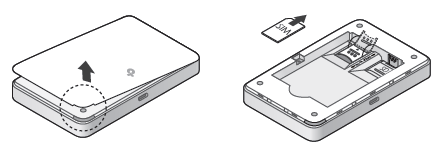
- Remove the back cover and insert the Nano SIM.
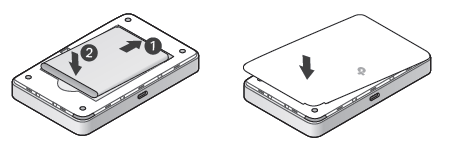
- Insert the provided battery and replace the back cover.
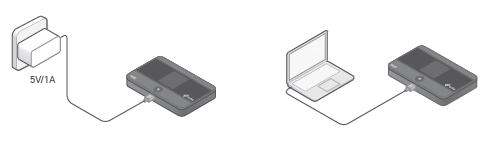
- You can charge the Pocket Wi-Fi® by connecting the power cable to a computer’s USB port, or to your own 5V/1A USB power adapter.
- To turn on the Pocket Wi-Fi®, press and hold the Power button until the screen lights up.
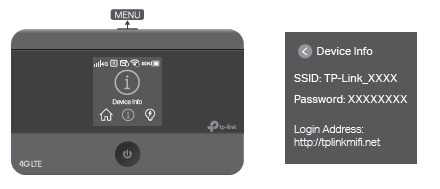
- Press the Menu button until the Device info option is shown, then press the Power button to select this option. The default Wi-Fi name (SSID) and Password will be shown on-screen—you can use these details to connect devices to the Wi-Fi.
- you want to change the Wi-Fi name and password, you can download the tpMiFi app from the App Store or Google Play.
Troubleshooting offline internet
- Press the Power button to bring the Pocket Wi-Fi® out of Power Saving mode, which turns off Wi-Fi when no devices are connected after 10 minutes.
- Make sure you're in an area with mobile coverage. Mobile bars are shown in the top-left corner of the screen.
- Restart the Pocket Wi-Fi®.