



What are Internode ADSL2+ Line Profiles?
ADSL2+ Line Profiles allow you to modify your connection's technical characteristics - to balance speed and stability, or to optimise latency. Line profiles are available to the following ADSL2+ customers:
- Easy Broadband
- Easy Naked (if connected to an Internode DSLAM)
- Extreme ADSL2+
- NakedExtreme ADSL2+
There is a trade-off between speed and stability on ADSL2+ services - the faster ADSL2+ runs, the more sensitive it becomes to interference, filtering, or connection problems. In some cases, these problems may cause connections to "drop out" (brief disconnections), or may reduce overall throughput.
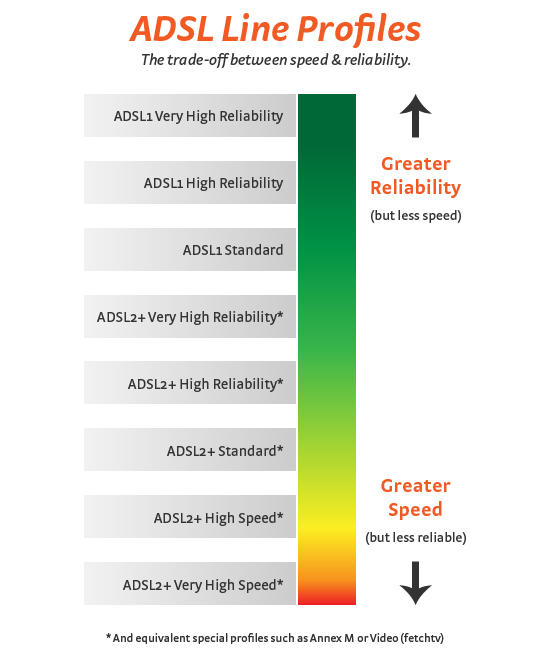 |
| Figure 1: Line Profiles and the trade-off between speed and stability |
Line profiles allow you to fine tune your connection to find the best balance between speed and stability.
IMPORTANT NOTES: In addition to standard profiles, we also have special ADSL2+ profiles to optimise latency, or increase upload speed (Annex M).
These special profiles are not available on all services, to all customers. Some limitations apply, depending on the capabilities of the infrastructure in your local telephone exchange.
There are no charges to change your ADSL2+ Line Profile.
- How do I change my Line Profile?
- New ADSL2+ connections
- Important Notes and Troubleshooting
- Special ADSL2+ Profiles
How do I change my Line Profile?
You can change your Line Profile online through My Internode:
- Log in to My Internode using your Internode username and password.
(Lost your password? Click here!) - Select Internode ADSL2+ profiles under My Services in the menu.
- Select the line profile you would like to use from the drop-down menu. Click Next >>> to continue.
- You will be asked to confirm your selection. If all is OK, click Proceed >>>.
NOTE: Profile changes typically take 15 minutes to take effect, but may take up to one hour.
New ADSL2+ connections
If you are a new customer, have recently relocated, or your service has been migrated to an Internode DSLAM, Internode may initially place your ADSL2+ service on the ADSL2+ High Reliability profile to ensure stability.
If the ADSL2+ High Reliability profile suits your needs, then no action is required. However, if you would like to maximise your connection speed, use our ADSL2+ profile change tool to select a profile which better suits your needs (or telephone line).
Important Notes and Troubleshooting
- Not all profiles are available to all customers. 'Annex M' profiles - which result in higher upload speeds - are only available on SOHO, Business & IBC Extreme, and NakedExtreme; as well as Easy Broadband and Easy Naked via most Internode DSLAM ports: See our Annex M FAQ for more information about Annex M.
- In rare situations, Internode may 'lock' your ADSL service to a particular profile for troubleshooting purposes. In this case you will not be able to change your ADSL profile online.
- Do not select a profile that your modem does not support - this may cause you to lose Internet access!
NOTE: If you change your line profile and subsequently cannot connect to the Internet, don't panic - contact our Support Team on 1300 788 233.
ADSL1 Profiles and long distances
If your home or office is a long distance from your telephone exchange, or if your connection speed is less than 8 Megabits per second, it may be worth trying an ADSL1 line profile (if these are available for your service):
- ADSL1 Very High Reliability
- ADSL1 High Reliability
- ADSL1 Standard
- ADSL1 Low Latency
In some cases, these profiles may outperform ADSL2+ profiles - improving speed or reliability (or both!). Because ADSL1 profiles always use full power (ADSL2+ profiles are designed instead to reduce cross-talk), you may squeeze better performance out of weaker or longer telephone lines.
Sync speed and throughput
As you push your connection to higher speeds, ADSL2+ becomes more sensitive to noise (e.g., cabling crosstalk or electromagnetic interference). At the worst, this will cause your connection to "drop out" (disconnect), however this can also cause other problems - particularly with throughput.
Even with a good connection speed, this noise may cause a high "error rate" - where data is not sent or received properly and has to be re-sent multiple times in order to reach its destination. This continual re-transmission of data (packets) can reduce your connection's throughput significantly - causing slow downloads.
Throughput has a greater impact on your ADSL2+ experience and download speeds than your connection (sync) speed.
If you're experiencing slowness - even if your modem reports a fantastic sync speed - it may indicate that your current line profile is unsuitable.
To resolve the problem, simply try a more reliable line profile, and then download a test file from our mirror to check your actual download speeds.
What should I do if my connection becomes unstable?
If your connection becomes unstable after a profile change, simply move back to a more stable line profile. There are also a variety of simple changes you can make to your premises to stabilise a connection or improve performance:
- Have a 'Central Splitter' professionally installed by a licensed cabler, or - for non-Naked services - use ADSL2+ certified in-line filters on all devices other than your ADSL router.
In every case, a Central Splitter is a better option than in-line filters. - Remove unnecessary devices from your telephone line.
- Keep all in-house phone line wiring as short as possible
- Ensure your router is running the latest firmware provided by its manufacturer (to take advantage of any performance improvements they may have made.)
- Use an Uninterruptible Power Supply (UPS) to protect your router and computer from power surges and signal interference from power lines.
For more information on improving performance, see the Optimising ADSL2+ guide.
Special ADSL2+ Profiles
In addition to standard ADSL2+ profiles there are some special line profiles (some or all of these may not be available to you, depending on your location and the infrastructure that your ADSL service is connected to:
- Low Latency:
Low Latency line profiles are ideal for gamers, or when latency is a concern. This profile alters error correction and may cause stability issues depending on your modem and phone line. - Initial:
Specifically designed to stabilise ADSL2+ connections, this line profile has a nominal 8 Megabit per second maximum downstream data speed, uses 'connection interleaving', and supports Annex L ('Long Reach' ADSL), offering excellent performance on long copper lines. - Annex M:
Annex M profiles allow for higher upload speeds (by sacrificing some download speed). For full information on Annex M, please see the Annex M FAQ. - ADSL1:
These profiles lock your service to ADSL1 mode only, which may help increase stability and speed on long lines.
