



Accounts & Billing Frequently Asked Questions
Choose which billing system applies to you:
 |
 |
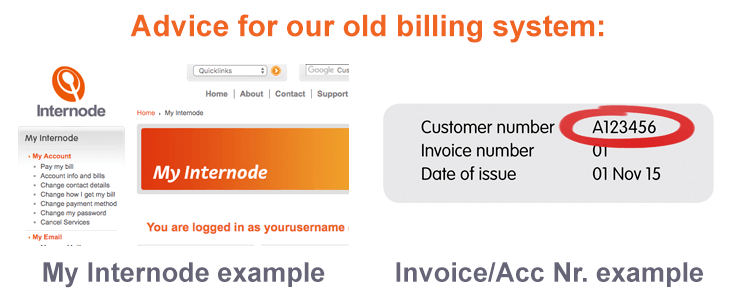
Advice for our old billing system
- General Billing
- What is the payment cycle for Internode services? How does it work in timing terms?
- How do my bills arrive?
- How can I pay for my Internode services?
- When Internode broadband is first connected, what bills can I expect—and when?
- When does my credit card get charged?
- What do the various parts of my bill mean?
- When can I expect interim billing or changes in the Billing Period?
- I think I've been double-charged or wrongly charged on a bill—what should I do?
- What should I do if I need further information or help with a bill?
- What if I want to cancel my Internode account?
- I've made a payment—where should I send the remittance advice?
- How can I check my current account balance or view past invoices?
- I've made a payment via Direct Credit, but it didn't appear on my account—why?
- How do I update my credit card information?
- Trading Terms and Suspensions
- What are Internode's trading terms?
- Will I receive a reminder?
- What if I'm having difficulties paying an account?
- What are the effects of non-payment or repeated late payment of a bill?
- What are the effects of a part payment of a bill? How does Internode allocate payments received?
- What will happen if payment is not received by the date specified on the Overdue Notice?
- If my account gets suspended, do I still need to pay for this period?
- How does a suspension of service work?
- If suspension occurs, how can I get my services reinstated?
- What do I do if I have a query with my account or bill?
- If I query my account, will I still get suspended?
- What if I am unable to pay due to financial hardship?
This FAQ is not a substitute for the Internode Customer Relationship Agreement (CRA).
The Customer Relationship Agreement takes precedence in case of any conflict in interpretation between this FAQ and those terms.
General Billing
What is the payment cycle for Internode services? How does it work in timing terms?
Internode manages accounts on a monthly cycle.
Invoices are created on the same date each month (for example, the 10th of every month). This date is called the Date of issue, and is displayed on the first page of your invoice.
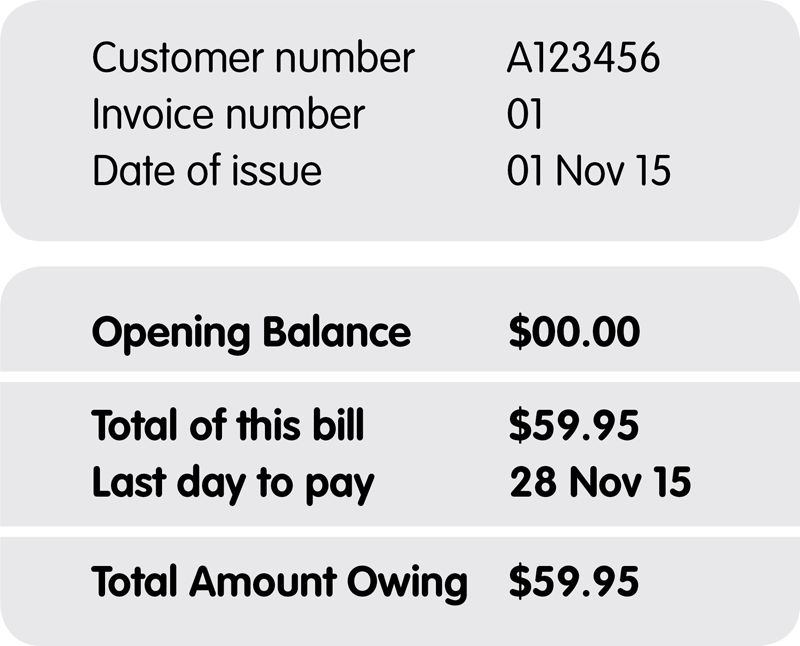 This example invoice section shows where you can find your Customer Number, Date of Issue, and Last day to pay.
Payment is due 28 days from the Date of Issue. This is called the Last day to pay, and is also listed on the first page of your invoice.
If you have automatic payments set up, your invoice will also include the date that Internode will attempt payment. We'll also tell you if a surcharge applies.
All base monthly fees are charged in advance, in accordance with normal industry practice. This means we will collect payment for the subsequent month just a few days before that month begins.
Usage-based charges (such as call charges, data blocks, or excess fees) are charged monthly in arrears.
You should expect to see the following items on your invoice:
- Any payments we have received since the previous Date of Issue.
- Base monthly fees for the coming month (in advance).
- In-arrears charges for any usage-based fees incurred since the previous Date of Issue.
- Any other charges or adjustments made since the previous Date of Issue.
- The date your invoice will be due (this is called the Last day to pay, and is 28 days from the Date of Issue).
You can check any charges or payments since your previous Date of Issue by logging into My Internode and checking Account Info and Bills.
How do my bills arrive?
Invoices are normally sent to the email address you nominated when you signed up. We can also fax or post your invoices if required. To change your contact method or address, follow the instructions on our Changing Contact Information page.
NOTE: Posting of paper invoices is available, but discouraged for environmental reasons. If requested, this will attract a $1.50 surcharge per invoice.
How can I pay for my Internode services?
Internode offers a variety of payment methods, including credit card, direct debit, and BPay. For more information, see Payment Methods.
When Internode broadband is first connected, what bills can I expect—and when?
Because Internode charges base monthly fees in advance, your first invoice must catch up with our regular billing cycle. To do this, your initial invoice will include the following charges:
- Your broadband setup fee.
- If you purchased a router from us:
- The cost of your broadband router.
- Freight (if the router was sent to you via courier).
- A credit card payment for the broadband router and freight.
- Your first monthly fee.
- A credit card payment for the first monthly fee, and the broadband setup fee (if you are paying by credit card).
- Your second monthly fee.
If you are paying by credit card, we will charge the setup fee and first month of service when the first invoice is created. This means that your remaining balance will only be the second monthly fee. The second monthly fee is not due until 28 days after the Date of Issue.
When does my credit card get charged?
Credit card payments are taken on a regular schedule. Your invoice will state when we will attempt to take payment and the amount of the transaction. This is generally 28 days after the Date of Issue—listed as the Last day to pay.
On some occasions, an amount may be collected outside of the regular schedule:
- When your service is first connected.
Your setup fee and first monthly fee are charged immediately (as noted in the previous question). This payment will appear on your next invoice. - If your financial institution declines your credit card payment.
We will retry each day to collect payment, in case the card was temporarily over its limit. You may see the charge on your card a few days later than predicted (but still for the predicted amount). You will also receive a notification advising you of the failed attempt. - If regular credit card payments were unsuccessful.
Just before we issue your next invoice we will try once more to collect the overdue amount. If this is successful, you will see this payment on the new invoice. - If you have purchased equipment.
Your credit card will be charged immediately if you buy equipment (for example, a broadband router).
All credit card payments will appear on later invoices, including the date and amount. You can also view pending transactions—including credit card charges—online through My Internode.
What do the various parts of my bill mean?
Internode invoices are modelled on utility company invoices.
The first page of your invoice summarises the financial status of your account. It also shows available payment methods, and any important notices. If you have automatic payments set up, it will also show when payment will be attempted.
The second page gives a detailed summary of base monthly fees, in-arrears charges, and payments you have made.
Specifically, the items on your invoice are:
| Customer Number: | A unique number identifying your Internode account. Your Customer Number will start with a letter, and include 6–7 numbers. |
|---|---|
| Invoice Number: | The number of your invoice. For example, if this number is 10, then this is the 10th invoice you have been issued. |
| Date of Issue: | The date that your invoice was created. |
| Opening Balance: | The balance brought forward from your previous invoice. |
| Total of this bill: | The total of any new charges during the month. See also New Activity. |
| Last day to pay: | The day that payment will be due. This is 28 days after the Date of Issue. Some payments take time to be processed: see Payment Methods for clearance times. |
| Total amount owing: | The total amount due, taking into account your Opening Balance and payments made since the previous invoice. |
| Payment Options: | Information on how to pay your account. |
| Payments: | Any payments you have made since your previous invoice. Some payments take time to be processed: see Payment Methods for clearance times. |
| New Activity: | Lists all charges on your account. This includes base monthly fees (charged monthly in advance), and in-arrears charges for usage-based fees, such as phone calls, or data blocks. |
| Closing Balance: | The total New Activity, minus any Payments you have made since your previous invoice. |
When can I expect interim billing or changes in the Billing Period?
If you upgrade or downgrade your service, or add an extra service, we may need to make changes to your billing period.
If you require any further assistance, please Contact our Billing Team.
I think I've been double-charged or wrongly charged on a bill—what should I do?
Chances are that you haven't been double-charged at all.
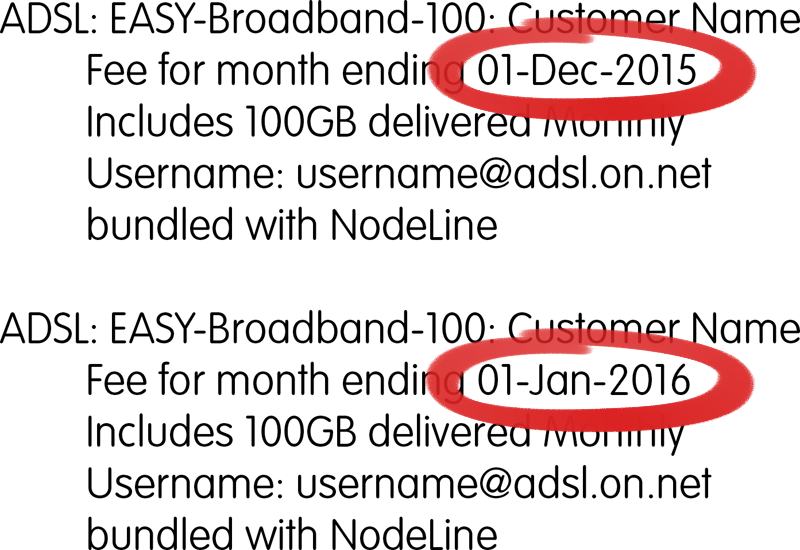 This invoice example shows two monthly charges for broadband. Note that the dates are different for each monthly fee.
 If your invoice includes more than one monthly charge, check the dates on the charges. Even if you have two monthly charges, they would not be for the same month.
This is because Internode charges its base monthly fees in advance. Sometimes your invoice will need to 'catch up' with the regular billing cycle. For instance, new customers will see their first and second monthly fees on their first invoice. On rare occasions, a regular monthly charge may not occur in advance. If this happens, the next bill will catch up on those charges.
We apologise for the inconvenience and confusion that these "catch up" invoices may cause. However, bringing your account up to date guarantees that future invoices will be simpler and more predictable.
If you are still unsure or need help, contact our Billing Team.
We recognise that mistakes are possible, and we're not claiming to be perfect. We're more than happy to investigate, explain, and—if necessary—correct any mistakes. Just contact us, and we'll be happy to help.
What should I do if I need further information or help with a bill?
If you have a query with your account, contact our Billing Team online or call us on 1300 889 188.
If any issues are not resolved to your satisfaction, follow our escalation procedure.
What if I want to cancel my Internode account?
We hope that you won't ever cancel your account. But we understand that needs and circumstances change, and you may need to do so in the future.
To cancel your account, please call our Billing team on 1300 889 188. Just like all other matters involving your account, we'll need to complete an ID check before processing a cancellation.
If you don't have access to a phone service, you can also contact our Billing team online. However, this method is not recommended unless you have no other means to contact us. This is because responses are slower, and back-and-forth correspondence is required to verify your identity and confirm the details of your account closure.
If you are within a contract, Early Cancellation Charges may apply. To see the full terms and conditions for your product—including any early cancellation charges—see our Critical Information Summary archive.
Our staff will reconcile your account and take steps to cancel your services on the nominated date. You'll also receive a refund for any unused months that you've paid in advance. If you're part-way through a month, no refund applies (as per our Customer Relationship Agreement).
I've made a payment—where should I send the remittance advice?
If you wish to send remittance advice to Internode, please include:
- Your Customer Number (including the letter at the beginning)
- The amount paid
- The date the payment was made
Your Customer Number can be found on the first page of your Invoice, in the top-right corner.
Once all this information is included, send your remittance advice to: remittanceadvice@internode.com.au
How can I check my current account balance or view past invoices?
You can view your current account balance using My Internode:
- Log in to My Internode using your Internode username and password.
(Lost your password? Click here!) - Select Account Info and Bills under My Account in the menu.
- Your Last Statement Balance and Pending Balance will be visible here. This will also show transactions not yet billed.
- To check past invoices, select Recent Invoices at the top of the screen.
I've made a payment via Direct Credit, but it didn't appear on my account—why?
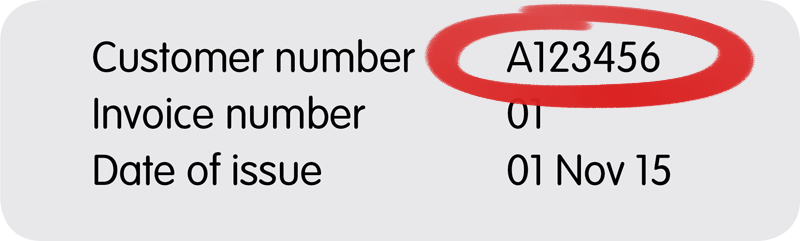 The Customer Number can be found on the first page of your invoice, at the top-right corner.
 There are two reasons why a Direct Credit payment may not appear. The first is that it may not have been identified as belonging to your account. Your payment must include your Customer Number as the Lodgement Reference. This must be the full Customer Number—including the letter at the start. If this number is missing or incomplete, it may prevent us from identifying your payment.
The second reason is that Direct Debit payments can take up to 4 days to be received by Internode. If you made payment more than 4 days ago, contact our Billing Team as soon as possible.
How do I update my credit card information?
You can update your credit card information online using My Internode. Full instructions are available on our credit card page.
You can also update your credit card information over the phone. Simply call our Billing Team on 1300 889 188.
Security Warning
Never send your credit card information to Internode—or anyone—via email. Internode will never email you requesting your credit card details.
Trading Terms and Suspensions
What are Internode's trading terms?
Payment is due 28 days from the date your invoice is created (the Date of Issue). This due date is shown on your invoice as the Last day to pay. Your account remains in "normal" credit status until the 28-day period has expired.
Will I receive a reminder?
If your payment is not received within 28 days of the Date of Issue, an "Overdue Notice" will be sent. This notice will be sent to your billing address, as well as via post (if this is not your normal billing method).
The "Overdue Notice" will state the amount due, and when payment must be received by in order to avoid suspension of services.
What if I'm having difficulties paying an account?
If you are having difficulties paying your account, contact our Billing Team online or call us on 1300 889 188 as soon as possible.
What are the effects of non-payment or repeated late payment of a bill?
Failure to make payment, or repeated late payments, may affect the provision of current or future Internode services.
If you require any further assistance, please Contact our Billing Team.
What are the effects of a part payment of a bill?
How does Internode allocate payments received?
You are obliged to pay the full amount detailed on your invoices by the Last day to pay. This date is stated on the first page of your invoice(s). If we only receive part payment, an overdue notice will be issued. If this happens, all services on the account are at risk of suspension.
Payments received are allocated against your account—not against an individual invoice.
If you need any further help, please Contact our Billing Team.
What will happen if payment is not received by the date specified on the Overdue Notice?
If payment is not received by the date on the Overdue Notice, your services will be suspended. A Suspension and Pending Disconnection Notice will also be sent. This Notice will be sent to your billing address, as well as via post (if this is not your normal billing method.)
Suspension applies to all services under a particular account. All services will be unavailable until Internode Pty Ltd receives the overdue amount.
If my account is suspended, do I still need to pay for this period?
If your account is suspended due to a default on your account, you are still required to pay for the service. This includes the suspended period. Because suspension occurred due to non-payment, no credits will be issued.
How does a suspension of service work?
Suspension occurs when an account remains unpaid after the date on the Overdue Notice. At this point, all services on the account will be suspended. Your services will remain unavailable until payment is received.
If suspension occurs, how can I get my services reinstated?
Internode must receive payment for the overdue amount to remove the suspension. Once payment has been received and processed, services will be re-instated within approximately 90 minutes.
Credit card payments can be made any time via our online payment gateway or our Pay By Phone service on 1300 553 233. This is the quickest way, as our billing system receives payment automatically. Be aware that surcharges apply for credit card payments.
There may be a delay if you're paying with cash, cheque, or money order. This is because Internode must receive your payment first, before we can apply it to your account. Some payment methods also have clearance times—see Payment Methods for more information.
What do I do if I have a query with my account or bill?
If you have an account query, contact our Billing Team online or call us on 1300 889 188.
If I query my account, will I still be suspended?
We aim to respond to queries as soon as possible, so a query should not affect the payment date (or suspension). An extension will only be granted if an issue needs investigation beyond the 28-day trading period.
What if I am unable to pay due to financial hardship?
If you are temporarily experiencing genuine financial hardship, you may be eligible for assistance under Internode's Financial Hardship Policy. Customers merely seeking to defer payment will not be eligible.
To learn more, including how to apply if needed, view our Finanical Hardship policy.
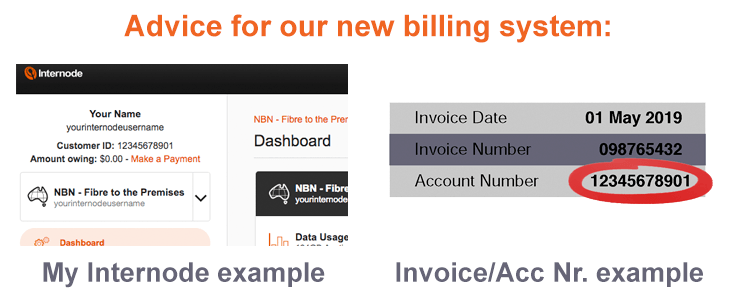
Advice for our new billing system
- General Billing
- What is the payment cycle for Internode services? How does it work in timing terms?
- How do my bills arrive?
- How can I pay for my Internode services?
- What bills can I expect—and when?
- When does my credit card get charged?
- What do the various parts of my bill mean?
- When can I expect interim billing or changes in the Billing Period?
- I think I've been double-charged or wrongly charged on a bill—what should I do?
- What should I do if I need further information or help with a bill?
- What if I want to cancel my Internode account?
- How can I check my current account balance or view past invoices?
- How do I update my credit card information?
- Trading Terms and Suspensions
- What are Internode's trading terms?
- Will I receive a reminder?
- What if I'm having difficulties paying an account?
- What are the effects of non-payment or repeated late payment of a bill?
- What are the effects of a part payment of a bill? How does Internode allocate payments received?
- What will happen if payment is not received by the date specified on the Overdue Notice?
- If my account gets suspended, do I still need to pay for this period?
- How does a suspension of service work?
- If suspension occurs, how can I get my services reinstated?
- What do I do if I have a query with my account or bill?
- If I query my account, will I still get suspended?
- What if I am unable to pay due to financial hardship?
This FAQ is not a substitute for the Internode Customer Relationship Agreement (CRA).
The Customer Relationship Agreement takes precedence in case of any conflict in interpretation between this FAQ and those terms.
General Billing
What is the payment cycle for Internode services? How does it work in timing terms?
Internode manages accounts on a monthly cycle.
Invoices are created on the same date each month (for example, the 10th of every month). This date is called the Invoice Date, and is displayed on the first page of your invoice.
Payment is due 14 days from the Invoice Date. This is called the Due Date, and is also listed on the first page of your invoice.
If you have automatic payments set up, your invoice will also include the date that Internode will attempt payment. We'll also tell you if a surcharge applies.
All base monthly fees are charged in advance, in accordance with normal industry practice. This means we will collect payment for the subsequent month before that month begins.
Usage-based charges (such as call charges, data packs, video-on-demand content, or excess fees) are charged monthly in arrears.
You should expect to see the following items on your invoice:
- Any payments we have received since the previous Invoice Date.
- Base monthly fees for the coming month (in advance).
- In-arrears charges for any usage-based fees incurred since the previous Invoice Date.
- Any other charges or adjustments made since the previous Invoice Date.
- The date your invoice will be due (this is called the Due Date, and is 14 days from the Invoice Date).
How do my bills arrive?
Invoices are sent to the email address you nominated when you signed up.
How can I pay for my Internode services?
Internode offers a variety of payment methods, including credit card, direct debit, and BPay. For more information, see Payment Methods.
What bills can I expect—and when?
First Invoice
Initial payment is taken as soon as you place your Internet service order. Your initial invoice will be sent to you once the payment has been processed. It will include the following:
- Setup fees for your Internet service.
- Your first monthly fee for your Internet service.
- Payment for the first Internet monthly fee, and the Internet service setup fee.
- If you purchased an Internet modem/router from us:
- The cost of your modem/router.
- Freight (if the modem/router was sent to you via courier).
- Payment for the modem/router and freight.
- If you purchased Fetch TV from us:
- The setup/set top box fee for your Fetch TV service.
- The first monthly fee for your Fetch TV service.
- Payment for the setup and first monthly fee for your Fetch TV service.
We will charge you for the items noted above, when the first invoice is created. This means that your first invoice is already paid upfront by the time you receive it.
Second Invoice
Your second invoice will be sent to you 9 days after your Internet service is provisioned and goes active. It will include the following:
- Your second monthly fee for your Internet service (in advance).
- If you purchased Fetch TV from us:
- The second monthly fee for your Fetch TV service (in advance).
Your second invoice will be due for payment on the Due Date noted on the invoice. This will be 14 days from the Invoice Date.
When does my credit card get charged?
Credit card payments are taken on a regular schedule. Your invoice will state when we will attempt to take payment and the amount of the transaction. This is generally 14 days after the Invoice Date—listed as the Due Date.
On some occasions, an amount may be collected outside of the regular schedule:
- When your service is first connected.
Your setup, hardware and first monthly fees are charged immediately (as noted in the previous question). - If your financial institution declines your credit card payment.
We will retry each day to collect payment, in case the card was temporarily over its limit. You may see the charge on your card a few days later than predicted (but still for the predicted amount). You will also receive a notification advising you of the failed attempt. - If regular credit card payments were unsuccessful.
Just before we issue your next invoice we will try once more to collect the overdue amount. If this is successful, you will see this payment on the new invoice. - If you have purchased hardware.
Your credit card will be charged immediately if you buy hardware (for example, a broadband router).
All credit card payments will appear on later invoices, including the date and amount.
What do the various parts of my bill mean?
Internode invoices are modelled on utility company invoices.
The first page of your invoice summarises the financial status of your account. It also shows available payment methods, and any important notices. If you have automatic payments set up, it will also show when payment will be attempted.
The second page gives a detailed summary of base monthly fees, in-arrears charges, and payments you have made.
Specifically, the items on your invoice are:
| Account Number: | A unique number identifying your Internode account. Your Account Number will include 10 numbers. (if your account number starts with a letter and not a number, please see our old billing system information. |
|---|---|
| Invoice Number: | A unique number identifying your invoice. |
| Invoice Date: | The date that your invoice was created. |
| Opening Balance: | The balance brought forward from your previous invoice. |
| This Bill: | The total of any new charges during the month. See also New Charges. |
| Due Date: | The day that payment will be due. This is 14 days after the Invoice Date. Some payments take time to be processed: see Payment Methods for clearance times. |
| Amount Due: | The total amount due, taking into account your Opening Balance and payments made since the previous invoice. |
| Payment Options: | Information on how to pay your account. |
| Payments Received: | Any payments you have made since your previous invoice. Some payments take time to be processed: see Payment Methods for clearance times. |
| New Charges: | Lists all charges on your account. This includes base monthly fees (charged monthly in advance), and in-arrears charges for usage-based fees, such as phone calls, or data packs. |
When can I expect interim billing or changes in the Billing Period?
If you upgrade or downgrade your service, or add an extra service, we may need to make changes to your billing period.
If you require any further assistance, please Contact our Billing Team.
I think I've been double-charged or wrongly charged on a bill—what should I do?
Chances are that you haven't been double-charged at all.
If your invoice includes more than one monthly charge, check the dates on the charges in the New Charges section. Even if you have two monthly charges, they would not be for the same month.
This is because Internode charges its base monthly fees in advance. Sometimes your invoice will need to 'catch up' with the regular billing cycle. On rare occasions, a regular monthly charge may not occur in advance. If this happens, the next bill will catch up on those charges.
We apologise for the inconvenience and confusion that these "catch up" invoices may cause. However, bringing your account up to date guarantees that future invoices will be simpler and more predictable.
If you are still unsure or need help, contact our Billing Team.
We recognise that mistakes are possible, and we're not claiming to be perfect. We're more than happy to investigate, explain, and—if necessary—correct any mistakes. Just contact us, and we'll be happy to help.
What should I do if I need further information or help with a bill?
If you have a query with your account, contact our Billing Team online or call us on 1300 889 188.
If any issues are not resolved to your satisfaction, follow our escalation procedure.
What if I want to cancel my Internode account?
We hope that you won't ever cancel your account. But we understand that needs and circumstances change, and you may need to do so in the future.
To cancel your account, please call our Billing team on 1300 889 188. Just like all other matters involving your account, we'll need to complete an ID check before processing a cancellation.
If you don't have access to a phone service, you can also contact our Billing team online. However, this method is not recommended unless you have no other means to contact us. This is because responses are slower, and back-and-forth correspondence is required to verify your identity and confirm the details of your account closure.
If you are within a contract, Early Cancellation Charges may apply. To see the full terms and conditions for your product—including any early cancellation charges—see our Critical Information Summary archive.
Our staff will reconcile your account and take steps to cancel your services on the nominated date. You'll also receive a refund for any unused months that you've paid in advance. If you're part-way through a month, no refund applies (as per our Customer Relationship Agreement).
How can I check my current account balance or view past invoices?
You can view your current account balance using My Internode:
- Log in to My Internode using your Internode username and password.
(Lost your password? Click here!) - Select Invoices in the left menu.
- Your Amount Owing will be visible here and also at the top of the menu.
- Past invoices are also available to download from this page.
How do I update my credit card information?
You can update your credit card information online using My Internode. Full instructions are available on our credit card page.
You can also update your credit card information over the phone. Simply call our Billing Team on 1300 889 188.
Security Warning
Never send your credit card information to Internode—or anyone—via email. Internode will never email you requesting your credit card details.
Trading Terms and Suspensions
What are Internode's trading terms?
Payment is due 14 days from the date your invoice is created (the Invoice Date). This due date is shown on your invoice as the Due Date. Your account remains in "normal" credit status until the 14-day period has expired.
Will I receive a reminder?
If your payment is not received within 14 days of the Invoice Date, an "Overdue Notice" will be sent. This notice will be sent to your email address.
The "Overdue Notice" will state the amount due, and when payment must be received by in order to avoid suspension of services.
What if I'm having difficulties paying an account?
If you are having difficulties paying your account, contact our Billing Team online or call us on 1300 889 188 as soon as possible.
What are the effects of non-payment or repeated late payment of a bill?
Failure to make payment, or repeated late payments, may affect the provision of current or future Internode services.
If you require any further assistance, please Contact our Billing Team.
What are the effects of a part payment of a bill?
How does Internode allocate payments received?
You are obliged to pay the full amount detailed on your invoices by the Due Date. This date is stated on the first page of your invoice(s). If we only receive part payment, an overdue notice will be issued. If this happens, all services on the account are at risk of suspension.
Payments received are allocated against your account—not against an individual invoice.
If you need any further help, please Contact our Billing Team.
What will happen if payment is not received by the date specified on the Overdue Notice?
If payment is not received by the date on the Overdue Notice, your services will be suspended. A Suspension and Pending Disconnection Notice will also be sent. This Notice will be sent to your email address.
Suspension applies to all services under a particular account. All services will be unavailable until Internode Pty Ltd receives the overdue amount.
If my account is suspended, do I still need to pay for this period?
If your account is suspended due to a default on your account, you are still required to pay for the service. This includes the suspended period. Because suspension occurred due to non-payment, no credits will be issued.
How does a suspension of service work?
Suspension occurs when an account remains unpaid after the date on the Overdue Notice. At this point, all services on the account will be suspended. Your services will remain unavailable until payment is received.
If suspension occurs, how can I get my services reinstated?
Internode must receive payment for the overdue amount to remove the suspension. Once payment has been received and processed, services will be re-instated within approximately 90 minutes.
Credit card payments can be made any time via our online payment gateway. This is the quickest way, as our billing system receives payment automatically. Be aware that surcharges apply for credit card payments.
There may be a delay if you're paying with BPay. This is because Internode must receive your payment first, before we can apply it to your account. Some payment methods also have clearance times—see Payment Methods for more information.
What do I do if I have a query with my account or bill?
If you have an account query, contact our Billing Team online or call us on 1300 889 188.
If I query my account, will I still be suspended?
We aim to respond to queries as soon as possible, so a query should not affect the payment date (or suspension). An extension will only be granted if an issue needs investigation beyond the 14-day trading period.
What if I am unable to pay due to financial hardship?
If you are temporarily experiencing genuine financial hardship, you may be eligible for assistance under Internode's Financial Hardship Policy. Customers merely seeking to defer payment will not be eligible.
To learn more, including how to apply if needed, view our Finanical Hardship policy.
