



Wireless Configuration for Billion 7800NL Routers
This guide is suitable for Billion 7800NL routers. You will also need an Ethernet cable to complete this guide.
What we'll cover:
- Logging into your router
- Turning your router's wireless settings on (or off)
- Securing your wireless network so only people you allow may connect
Not what you're looking for? Try the Billion 7800NL ADSL setup guide.
Configuring your Wireless network
Step 1
- Make sure that your computer is connected to your router with an Ethernet cable.
- Open your preferred web browser, for example: Internet Explorer, Google Chrome, or Mozilla Firefox.
- Enter the following number into the address bar and then hit Enter on your keyboard:
- 192.168.1.254 (this number is called an IP Address).
 |
| Figure 1: Entering the IP address to access the router |
Step 2
- The modem Log In page will open. You will be prompted for a username and password.
| Username: | admin |
|---|---|
| Password: | admin |
| This is the router's default username and password. We recommend that you change the password for security reasons. |
|
- Click OK to log in to the router.
Step 3
- Click Quick Start from the menu to the left of the screen.
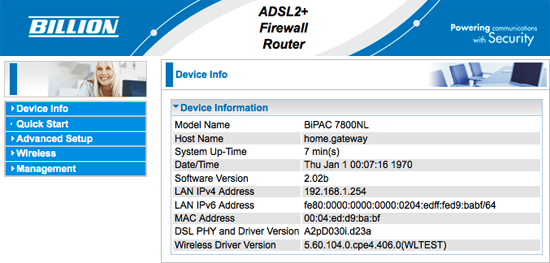 |
| Figure 2: The Billion 7800NL Status Page |
Step 4
- The Quick Start wizard will appear.
- Click Jump to Wireless setting.
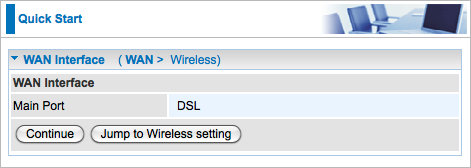 |
| Figure 3: The first page of the Billion 7800NL Quick Start wizard |
Step 5
- The Wireless Configuration page will be displayed.
- Ensure that Wireless is set to Enable.
- Create a name for your wireless network and enter this into the field labelled SSID.
Creating a network name (SSID)
Your network name is used to identify your wireless network. This is particularly useful if there are other wireless networks nearby.
Because your network name will be visible outside of your home or office, the name should be recognisable but should not use any personal or service details.
- Bad Network Names:
BloggsFamily, JoeBloggs, 123JamesStreet, Internode, default, your Internode username, your router's name/brand. - Good Network Names:
MyNetwork, HomeWireless, Homestead, Cookie Monster (be creative!)
Step 6
- Set the Network Authentication to WPA2-PSK. Further options will appear underneath.
- Delete the text in the WPA/WAPI passphrase field.
- Create a password that will be used to access your wireless network. This needs to be entered next to WPA/WAPI passphrase.
Creating a Pre-shared Key (Wireless Password)
A Pre-shared key prevents people you don't know from accessing your wireless network. When you connect your computers to your wireless network, you will be asked for the pre-shared key. If someone tries to connect without the pre-shared key, they will be unable to connect.
Your pre-shared key:
- must have a minimum of 8 alphanumeric characters (the longer the better)
- is case sensitive
- should never be the same as your Internode password - or any password you currently use!
We recommend you create a complex password for your pre-shared key.
- Once you have entered a password (pre-shared key), click Continue.
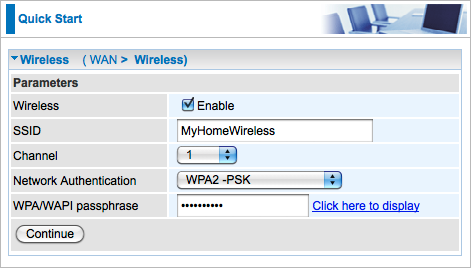 |
| Figure 4: The Wireless page of the 7800NL Quick Start wizard |
Step 7
- The Quick Start wizard will display a Success screen. You may close the browser window..
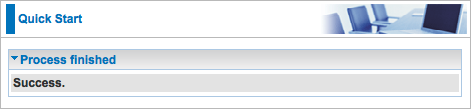 |
| Figure 5: Successful completion of the Billion 7800NL Wizard |
Congratulations! You have successfully configured the wireless settings on your Billion 7800NL router.
To connect your computer to the network, please refer to the following guides:
- Connecting a Windows computer to a wireless network
- Connecting a Macintosh computer to a wireless network
Further Assistance
If you are looking to set up your Internet or Fetch TV service, please refer to the following setup guides:
If you are having trouble setting up your router or would like to clarify some of the steps, please contact our Support Team.
