

Internode
  • Internet
    • NBN™
      • NBN Fibre Plans
      • NBN Wireless Plans
      • Coverage
    • Other Internet Products
      • Home Wireless Broadband
      • 5G Home Broadband
    • Need assistance? Call sales and support on 13 66 33
  • Mobile
  • TV
  • Business
    • Internet
      • NBN™
      • Fibre
      • Option packs
      • Hardware
    • Phone
      • NodeLine
      • NodeMobile
      • NodePhone VoIP
    • Connecting Offices
      • Case studies
      • Data centres
      • Internode Business Connect
      • Managed equipment
    • Need assistance? Call sales and support on 13 66 33
  • Support

    • Online guides

    • Online tools

    • Network status

    • Accounts and billing

    • Order status

    • FAQ
    •  
      Technical support
      1300 788 233
      Mon to Fri: 7am-12am
      Sat - Sun: 7am-12am
      Central Time (Adelaide)
      Accounts and billing
      1300 889 188
      Mon to Fri: 7am-8pm
      Sat - Sun: 7am-7pm
      Central Time (Adelaide)
      Provisioning
      1300 300 509
      Mon to Fri: 8am-7:30pm
      Sat - Sun: Closed
      Central Time (Adelaide)
  • Moving?
  • Contact
Need assistance? Call sales and support on 13 66 33

  Login to My Internode

Log into:
Forgotten your password?
Support
  • Guides
    • General Settings
    • Internet Access
      • NBN
      • TurboFibre FTTB
      • Broadband ADSL
      • Home Wireless Broadband
        • Set up Home Wireless Broadband
        • Troubleshooting Home Wireless Broadband for No Connection
        • Troubleshooting Home Wireless Broadband Speed Issues
        • Home Wireless Broadband FAQ
        • Factors affecting Home Wireless broadband speed
      • 5G Home Broadband
      • Fibre Estates FTTP
      • OPENetworks FTTN
      • IPv6
      • NodeMobile Data
      • Improving WiFi Signal
      • Quota & Shaping information
    • Mobile
    • NodePhone
    • NBN Phone
    • Wireless Guides
    • Fetch TV
  • Tools
  • Network Status
  • Security
  • Accounts and Billing
  • FAQ
  • Contact Support
  • Historical Product Info
  • How to check for NBN outages
  • How to run a ping and traceroute using PingPlotter
Arrow Up Home Wireless Broadband


Home - Support - Guides - Internet Access - Home Wireless Broadband - Troubleshooting Home Wireless Broadband for No Connection

Online Guides

Steps for troubleshooting Home Wireless Broadband Connection issues

Troubleshooting Home Wireless Broadband for No Connection

Please note: Your Home Wireless Broadband service is only for use at the address nominated on your application. If you've moved home, please see Moving Home and contact us to make arrangements.

If your 4G Home Wireless Broadband service is offline, you won’t be able to visit a website, browse, stream, or download. Email and any other services that use the internet will not work. These steps will help you identify the issue.

  1. Make sure that your SIM is inside the SIM slot. If the SIM is missing, please call us on 1300 788 233 to order a replacement.

    NetComm NL20 Modem
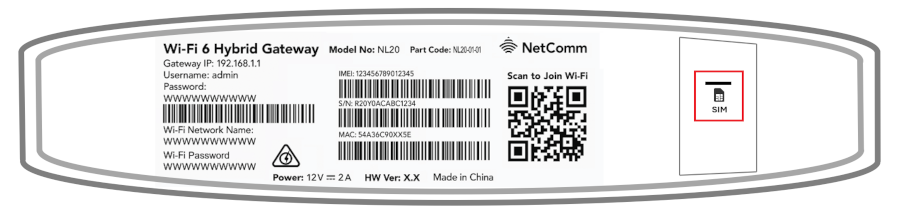
    Smart Modem Gateway

    Note: Your SIM card slot may be covered by a black sticker to prevent tampering.
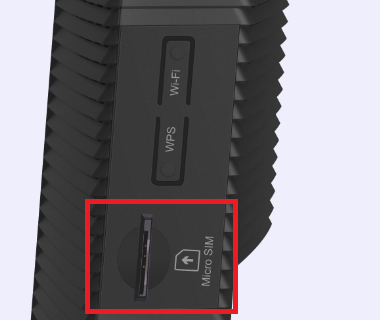
  1. Make sure that your modem cables are plugged in and not damaged.

    You’ll need to replace any broken or chewed cables
  1. Turn off the electrical outlet for your modem and leave it off for at least 10 seconds.
  2. Turn the outlet back on and wait approximately 3 minutes for the modem lights to settle, then try to view a website.

    NetComm NL20 Modem
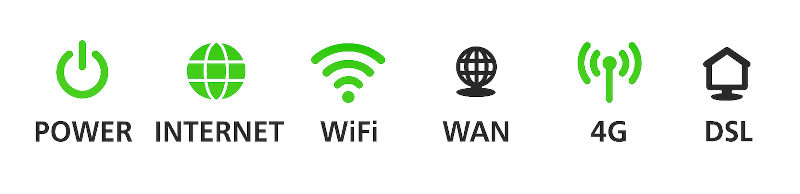
    Smart Modem Gateway

  1. Check your modem's 4G light. If it's red, move your modem to a different location, ideally near a window and away from direct sunlight.
     
    Can't get a good signal? Give us a call on 1300 788 233 for further assistance.
  2. If you're testing on a WiFi device, stand next to your modem to rule out any WiFi signal issues. Move further away and monitor the WiFi signal strength.
  3. If you lose your WiFi connection in certain parts of your home, see our guide on improving WiFi signals.
  4. Attempt to view a website on a device connected to your modem via Ethernet cable, not WiFi. If Ethernet works but WiFi doesn't, confirm that the WiFi lights on your modem are on.
    Note: Pressing the WiFi button on the side of the modem will turn WiFi on/off. WiFi may have been turned off accidentally.
  5. Still can't get online? Please call us on 1300 788 233 for further assistance.
  • Internode
  • About Us
  • Privacy Statement
  • Make a Complaint
  • Legal Information
  • Authorised Representatives
  • © 2026 Internode Pty Ltd
We acknowledge the Traditional Custodians of Country throughout Australia and the lands on which we, and our communities live, work and connect. We pay our respects to their Elders, past, present, and emerging.