



Configuration Guide for OPEN Networks 812L
This guide is suitable for OPEN Networks 812L Analog Telephone Adapters (ATA).
What we'll cover:
- Connecting cables
- How to find the IP address for your OPEN Networks 812L
- How to log in to the OPEN Networks 812L
- Setting up your NodePhone VoIP service
- Testing your NodePhone VoIP service with our test phone numbers
OPEN Networks 812 Cable Setup
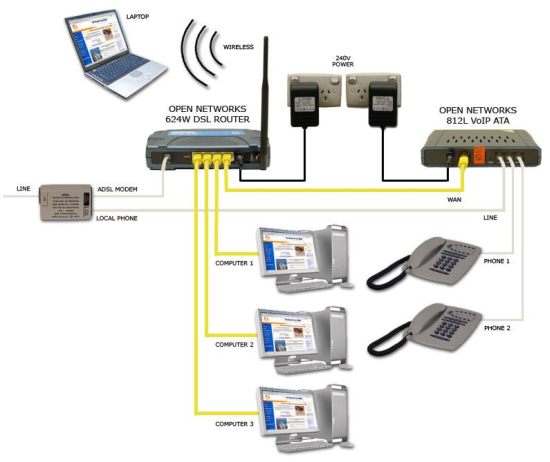 |
| Figure 1: Typical cabling for an OPEN Networks 812L ATA |
- Connect one end of the supplied Ethernet cable to the Ethernet port on the OPEN Networks 812L. Connect the other end of the Ethernet cable to a spare Ethernet port on your ADSL router.
- Connect the power supply to the back of the OPEN Networks 812L, and plug it into a 240V power outlet.
- Connect the supplied telephone cable to the Local Phone port on your ADSL Line Filter, and connect the other end to the Line port on the OPEN Networks 812L.
- Connect your telephone handset to the Phone 1 port on the OPEN Networks 812L.
Find the IP Address for your OPEN Networks 812L
Step 1
Your ADSL router will automatically assign an IP address to the OPEN Networks 812L. This is a broad overview based on common methods to obtain this IP address:
- Open your preferred web browser - for example, Internet Explorer, Google Chrome, or Mozilla Firefox.
- Log into your ADSL router as per the router's user guide.
- Follow your ADSL router's user guide to find the list of connected DHCP Clients. This is a list of all the devices connected to your ADSL router, and the IP Addresses that they are using to connect.
In most routers you will find a section titled DHCP under the Status menu.
For example, if you have an OPEN Networks 624 or 625 series router, click on the Status tab, and then click on DHCP Clients. This will present a list of IP addresses, including the OPEN Networks 812L.
- Write down the IP address of your OPEN Networks 812L.
Step 2
- Open your preferred web browser - for example, Internet Explorer, Google Chrome, or Mozilla Firefox.
- Enter the IP address that you obtained in Step 1 into the address bar and hit Enter on your keyboard.
- The login page will open. You will be prompted for a username and password.
| Username: | root |
|---|---|
| Password: | 0P3N (Zero, Capital P, Three, Capital N) |
| This is the ATA's default username and password. We recommend that you change the password for security reasons. |
|
Configuring your NodePhone VoIP service
Step 1
- On the bottom of the page, click >> Step 1: Network Selection.
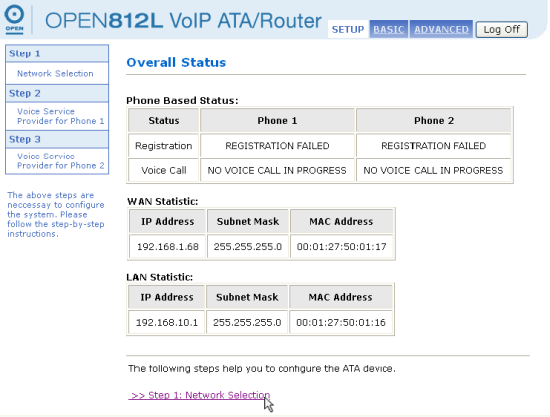 |
| Figure 7: Locating the Network Selection screen |
Step 2
- Click Proceed to Step 2 (The current default settings are generally suitable).
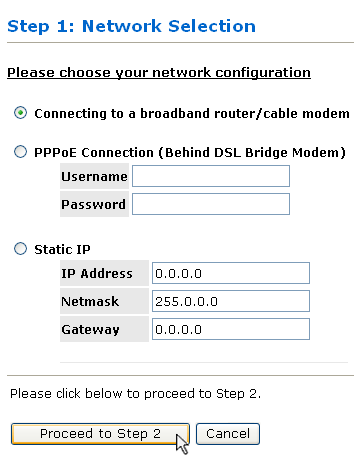 |
| Figure 8: Skipping the Network Selection screen |
Step 3
Enter your NodePhone details:
- In the Auth User ID and User Name fields, enter your NodePhone number, for example, 0871270182.
- In the Password field, enter your NodePhone password
- Click Proceed to Step3 to continue the wizard.
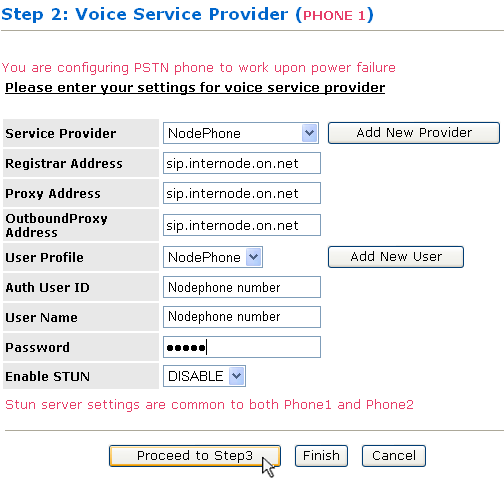 |
| Figure 9: Entering Voice Service Provider settings |
Step 4
- Simply click Finish to end the wizard.
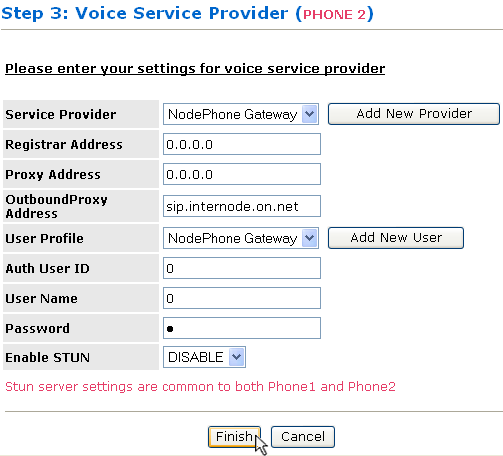 |
| Figure 10: The Finish button at the bottom of the screen |
Step 5
- The Save-Reboot process may take a few minutes.
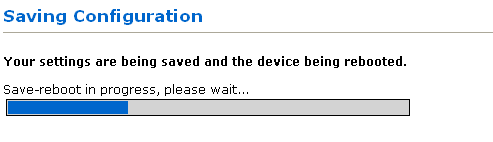 |
| Figure 11: Saving and Rebooting |
Congratulations! You have successfully configured your OPEN Networks 812L. Before you can begin making calls, you may need to reboot your modem and your OPEN Networks 812L.
You can test the phone service by dialling the numbers listed below:
| Test Number | Function |
|---|---|
| 08 7127 1201 | Echo Test (plays your own voice back to you) |
| 08 7127 1202 | Music (plays 10 Minutes of Radio Paradise) |
| 08 7127 1203 | Call Line ID Presentation Check (reads back your CLID to you, if it's turned on) |
| 08 7127 1204 | Talking Clock (reads back the current time to you) |
Further Assistance
Basic troubleshooting information can be found at the NodePhone FAQ page.
If you are having trouble setting up your ATA, or would like to clarify some of the steps, please contact our Support team.
